
15 Best SEO Tools for Bloggers in 2026 (Free & Paid Options Compared)

Best SEO Tools for Bloggers in 2025: Free & Paid Options Compared
Bloggers who use SEO tools grow faster. They find better keywords, write stronger content, and track what’s working — without guessing.
This guide covers the 15 best SEO tools for bloggers in 2025. Each tool includes a clear overview, key features, and honest pros and cons, so you can choose the right one for your blog stage and budget.
What Are SEO Tools for Bloggers?
SEO tools help bloggers rank higher in search engines. They show which keywords to target, how to optimize content, and where your site has technical problems.
The four core jobs these tools do:
- Find keywords with real search demand
- Analyze what top-ranking content does differently
- Track your rankings over time
- Identify and fix technical issues holding you back
Quick Comparison Table
| Tool | Best For | Free Plan | Starting Price |
|---|---|---|---|
| Semrush | All-in-one SEO | ✅ Limited | $139.95/mo |
| Ahrefs | Backlinks & content research | ❌ | $129/mo |
| Google Search Console | Rank monitoring | ✅ Full | Free |
| Ubersuggest | Budget beginners | ✅ Limited | $29/mo |
| Surfer SEO | Content optimization | ❌ | $89/mo |
| RankMath | WordPress SEO plugin | ✅ Full | Free / $6.99/mo |
| Yoast SEO | WordPress SEO plugin | ✅ Full | Free / $99/yr |
| KWFinder | Low-competition keywords | ✅ 2/day | $29/mo |
| NeuronWriter | AI content optimization | ❌ | $23/mo |
| SEOBoost | Content briefs | ❌ | $19/mo |
| Answer the Public | Question keywords | ✅ Limited | $9/mo |
| Google Analytics 4 | Traffic behavior | ✅ Full | Free |
| Screaming Frog | Technical SEO audit | ✅ 500 URLs | £199/yr |
| TopicRanker | Easy-win keyword gaps | ❌ | $99/mo |
| Google Keyword Planner | Keyword volume | ✅ Full | Free |
Why Bloggers Need SEO Tools
Without SEO tools, you are guessing. You pick topics based on intuition, write without knowing if anyone searches for them, and publish without checking whether your content is good enough to compete.
SEO tools replace guesswork with data. They tell you:
- Which keywords have traffic potential and are realistically winnable
- What the top 10 ranking pages cover that you don’t
- Whether Google can even find and index your content
- Which posts are close to ranking — and just need a small push
Blog SEO also compounds. A post optimized today can drive traffic for three to five years. That long-term payoff makes every hour spent with the right tools worth it.
All-in-One SEO Tools
These platforms handle everything: keyword research, competitor analysis, rank tracking, backlink monitoring, and technical audits — all under one roof.
1. Semrush
Semrush is the most complete SEO platform available for bloggers. It covers every stage of the SEO workflow, from finding your first keyword to auditing a site with thousands of pages.
Overview
Semrush started as a keyword research tool in 2008. Today it’s a full SEO suite used by over 10 million marketers worldwide. Its keyword database contains 26 billion+ keywords across 140+ countries.
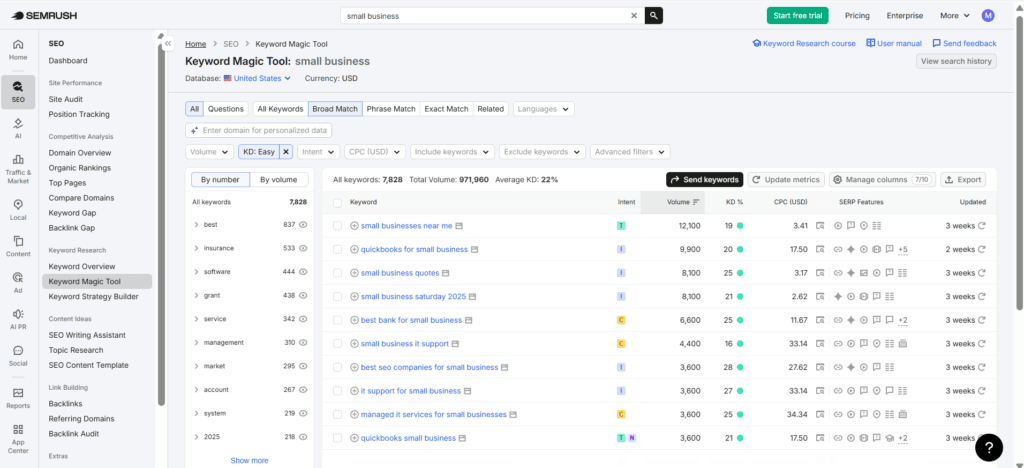
For bloggers, Semrush is most valuable for keyword research, competitor gap analysis, and real-time content optimization inside Google Docs or WordPress.
Key Features
- Keyword Magic Tool — Search 26B+ keywords. Filter by difficulty, intent, question format, and word count.
- Position Tracking — Monitor daily ranking changes for any set of target keywords.
- Writing Assistant — Live SEO scoring inside Google Docs or WordPress as you write.
- Site Audit — Crawls your blog and prioritizes technical issues by severity.
- Competitor Analysis — See every keyword a competitor ranks for and find content gaps.
- Backlink Analytics — Monitor your link profile and identify link-building opportunities.
- Content Ideas — Pulls trending topics from top-performing content in your niche.
Pros and Cons
| ✅ Pros | ❌ Cons |
|---|---|
| Largest keyword database in the industry | Expensive for solo bloggers |
| Writing Assistant is uniquely useful while drafting | Interface is complex for beginners |
| Competitor gap analysis saves hours of research | Free plan limits are tight (10 queries/day) |
| Daily rank tracking with visual trend charts | Some features require add-on purchases |
| Integrates with Google Analytics & Search Console | Data overload without a learning curve |
Best for: Bloggers 12+ months in, earning revenue, and ready to scale content production.
2. Ahrefs
Ahrefs has the most accurate backlink database in the industry. Bloggers use it to reverse-engineer competitor content strategies and identify link-building opportunities.
Overview
Ahrefs began as a backlink analysis tool and has since expanded into a full SEO suite. Its Content Explorer feature — which indexes 14 billion web pages — is one of the most powerful content research tools available anywhere.
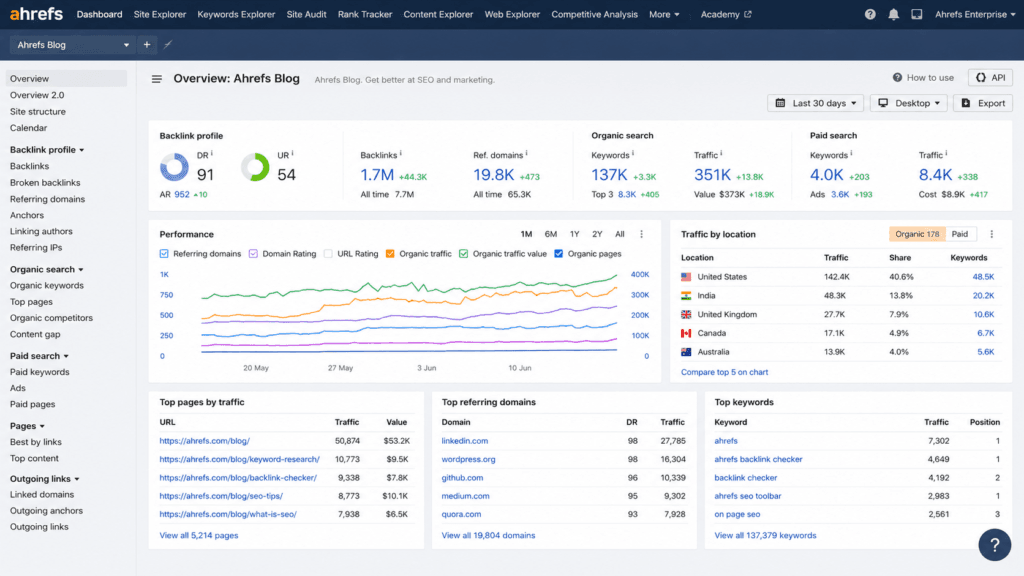
Ahrefs is particularly strong for bloggers who want to understand why certain content ranks and build a data-backed strategy to compete.
Key Features
- Keywords Explorer — Keyword difficulty scores, click potential, and parent topic grouping.
- Content Explorer — Discover which articles in any niche get the most traffic, backlinks, and shares.
- Site Explorer — Full breakdown of any domain’s organic keywords, top pages, and backlink profile.
- Rank Tracker — Track keyword positions over time across Google, Bing, and YouTube.
- Site Audit — Crawl your blog for 140+ SEO issues with actionable fixes.
- Content Gap — Find keywords competitors rank for that you don’t.
- Ahrefs Webmaster Tools — Free site audit and basic keyword tracking for your own domain.
Pros and Cons
| ✅ Pros | ❌ Cons |
|---|---|
| Most accurate backlink data available | No free plan (only free for your own site) |
| Content Explorer is unmatched for ideation | More expensive than most alternatives |
| Clean, intuitive interface | Keyword data can lag slightly vs. Semrush |
| Excellent for finding content gaps | No native writing assistant |
| Strong historical ranking data | Limited social media integration |
Best for: Bloggers who prioritize content research, competitive analysis, and link building.
Free SEO Tools for Bloggers
You can build a strong SEO foundation at zero cost. These tools are free, reliable, and used by professional bloggers worldwide.
3. Google Search Console
Google Search Console is the most important free SEO tool for bloggers. It connects directly to Google’s index — giving you data no third-party tool can replicate.
Overview
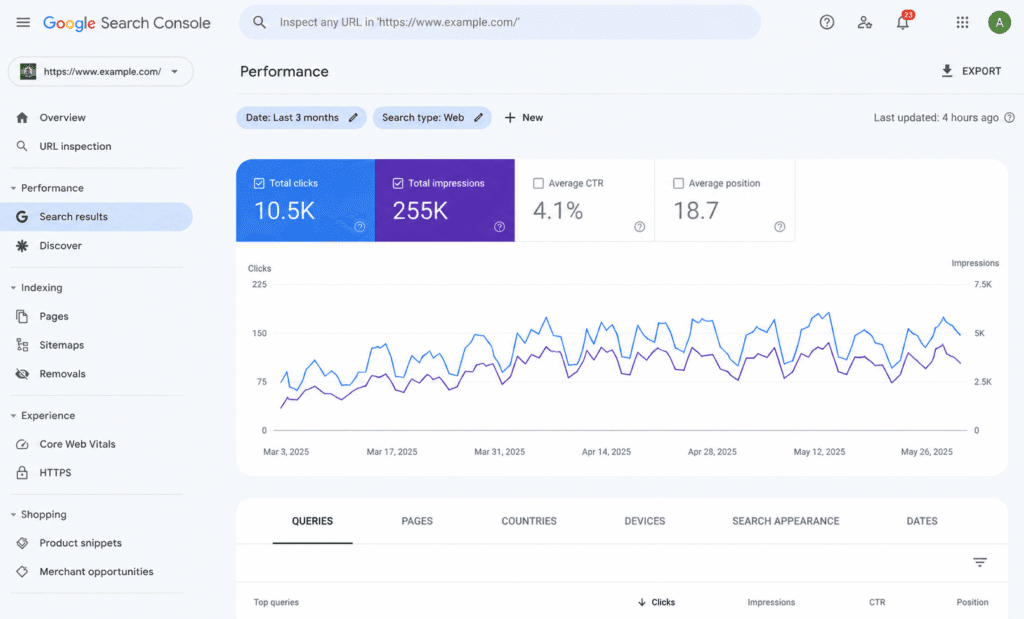
Google Search Console (GSC) shows exactly how Google sees your blog: which pages are indexed, which queries trigger your content to appear, and how users interact with your search listings. Every blogger should install it on day one.
Key Features
- Performance Report — See clicks, impressions, click-through rate (CTR), and average position for every query and page.
- Coverage Report — Shows which pages are indexed and flags indexing errors with explanations.
- Core Web Vitals — Measures loading speed, interactivity, and layout stability — all Google ranking factors.
- URL Inspection — Submit any new post to Google for faster indexing.
- Sitemaps — Submit your XML sitemap so Google crawls your entire blog efficiently.
- Search Appearance — Tracks which rich results (FAQs, articles, breadcrumbs) your site earns.
Pros and Cons
| ✅ Pros | ❌ Cons |
|---|---|
| Completely free | GA4 interface has a steep learning curve |
| Deep behavioral data unavailable in Search Console | Not an SEO tool — no keyword or ranking data |
| Custom event tracking for monetisation goals | Sampling on high-traffic sites can skew data |
| Integrates with Search Console, Google Ads, BigQuery | Universal Analytics data doesn't migrate to GA4 |
| Real-time visitor data | Some privacy regulations limit data collection |
Best for: All bloggers. Pairs with Search Console for a complete free analytics stack.
5. Google Keyword Planner
Google Keyword Planner gives you keyword volume data directly from Google Ads. It's free and authoritative — the data comes from the same source Google uses for its ad auction.
Overview
Originally built for advertisers, Keyword Planner is freely available to anyone with a Google account. It provides search volume ranges, seasonal trends, and related keyword suggestions for any seed term.
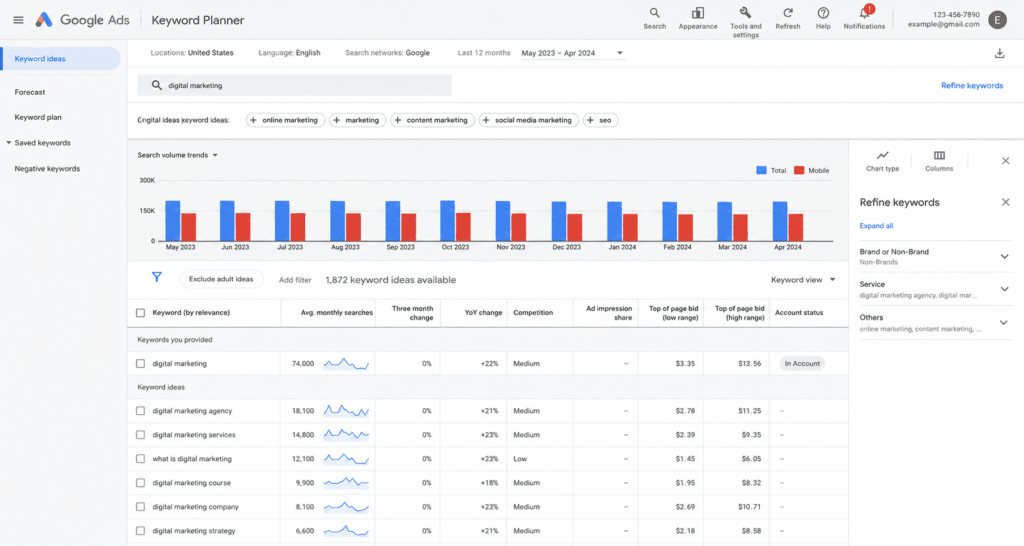
The main limitation is that volumes are shown as ranges (e.g., "1K–10K") rather than exact figures unless you're running active ad campaigns.
Key Features
- Keyword Ideas — Enter any seed term and get hundreds of related keyword suggestions.
- Historical Search Trends — See how search volume fluctuates month by month.
- Location Targeting — Filter keyword data by country, region, or city.
- Competition Data — Shows advertiser competition (high/medium/low) as a rough organic competition proxy.
- Forecast Tool — Projects clicks and impressions for any keyword list.
Pros and Cons
| ✅ Pros | ❌ Cons |
|---|---|
| Completely free | Search volumes shown as ranges, not exact numbers |
| Data comes directly from Google | Designed for paid search — intent signals are ad-focused |
| Seasonal trend data is genuinely useful | No keyword difficulty scores |
| Good starting point for topic cluster planning | Requires Google Ads account (no spend needed) |
| Location-specific volume data | Limited compared to dedicated keyword tools |
Best for: Bloggers validating keyword ideas on a zero budget.
6. Ubersuggest
Ubersuggest is the best free/low-cost all-in-one SEO tool for new bloggers. It provides keyword research, content ideas, backlink data, and rank tracking in a single accessible interface.
Overview
Built by digital marketing expert Neil Patel, Ubersuggest is designed to make professional SEO data accessible to bloggers and small businesses. The free plan is genuinely useful — not a locked teaser.
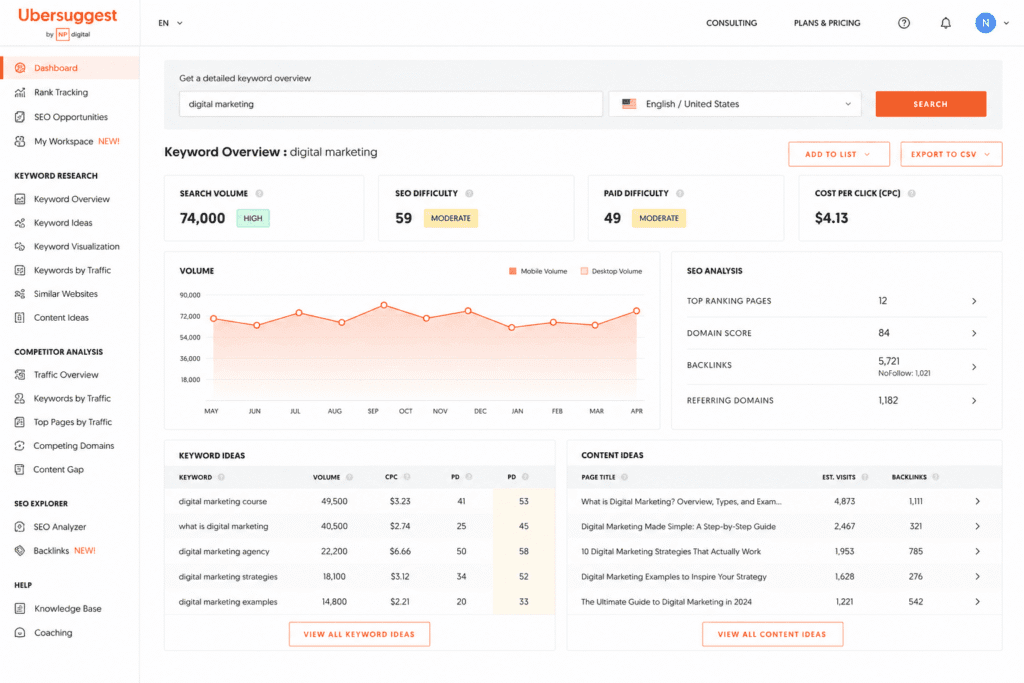
Its unique "Comparison Keywords" feature surfaces X vs. Y queries, which are high-converting content angles for bloggers in any niche.
Key Features
- Keyword Overview — Search volume, keyword difficulty, CPC, and SERP analysis per keyword.
- Keyword Ideas — Related keywords, question-format queries, and comparison phrases.
- Content Ideas — Top-performing articles for any keyword, with backlinks and estimated visits.
- Site Audit — On-page and technical SEO health check for your blog.
- Rank Tracking — Weekly keyword position monitoring.
- Backlink Checker — View referring domains and anchor texts pointing to any URL.
Pros and Cons
| ✅ Pros | ❌ Cons |
|---|---|
| Generous free tier — no credit card required | Free plan limits searches to 3/day |
| Clean, beginner-friendly interface | Less data depth than Semrush or Ahrefs |
| Comparison keyword feature is unique | Backlink database smaller than Ahrefs |
| Content ideas include real traffic estimates | Rank tracking is weekly, not daily |
| Chrome extension available for free | Site audit not as detailed as Screaming Frog |
Best for: Bloggers in their first 6–12 months who need broad SEO coverage without the price tag.
Keyword Research Tools
Finding the right keyword before you write is the single highest-leverage SEO action available to bloggers. These tools are purpose-built for it.
7. KWFinder by Mangools
KWFinder is the most accurate and beginner-friendly keyword difficulty tool available. It excels at surfacing low-competition keywords that new blogs can realistically rank for.
Overview
KWFinder is part of the Mangools suite of SEO tools. Its keyword difficulty score is widely regarded as more accurate for smaller sites than Semrush or Ahrefs, because it accounts for the full backlink profile of ranking pages rather than just domain authority.
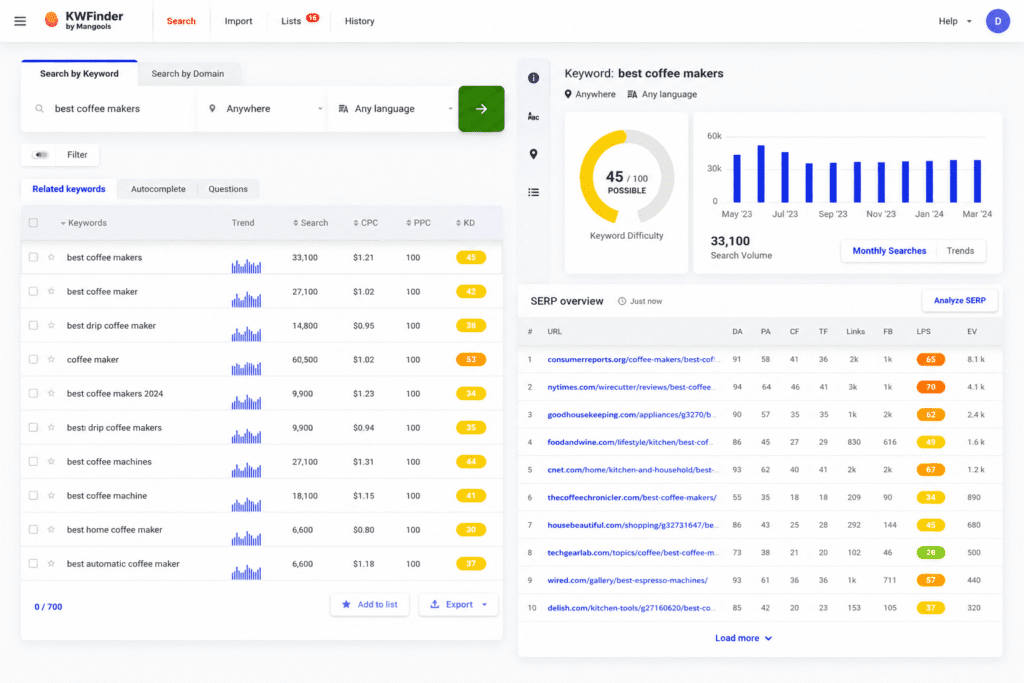
Enter any seed keyword, select your country, and instantly see which related terms you can compete for — even without a large backlink profile.
Key Features
- Keyword Difficulty Score — Colour-coded 0–100 score with an easy-to-win label.
- Long-Tail Suggestions — Hundreds of related keyword variations per search.
- SERP Analysis — Live preview of the top 10 results with DA, backlinks, and content age.
- Autocomplete & Questions — Surfaces queries from Google Autocomplete and "People Also Ask."
- Local Keyword Data — Search volume by country, region, or city.
- Historical Trends — Month-by-month search volume over 24 months.
Pros and Cons
| ✅ Pros | ❌ Cons |
|---|---|
| Keyword difficulty score is highly accurate | Limited to 2 searches/day on free plan |
| Intuitive interface — no learning curve | Not an all-in-one tool (no rank tracking in free tier) |
| SERP preview saves time researching manually | Smaller keyword database than Semrush |
| Affordable entry-level pricing | No content optimization features |
| Excellent local SEO keyword data | Mobile app is basic |
Best for: Bloggers building their keyword list and wanting to target achievable, low-competition terms.
8. Answer the Public
Answer the Public visualises every question your audience types into Google. It's the fastest way to find question-based and long-tail keyword opportunities.
Overview
Answer the Public scrapes Google and Bing autocomplete to generate a visual map of questions, prepositions, and comparisons around any seed keyword. Type "home coffee" and instantly see 200+ real search queries — from "home coffee bar ideas" to "which home coffee machine is worth it."
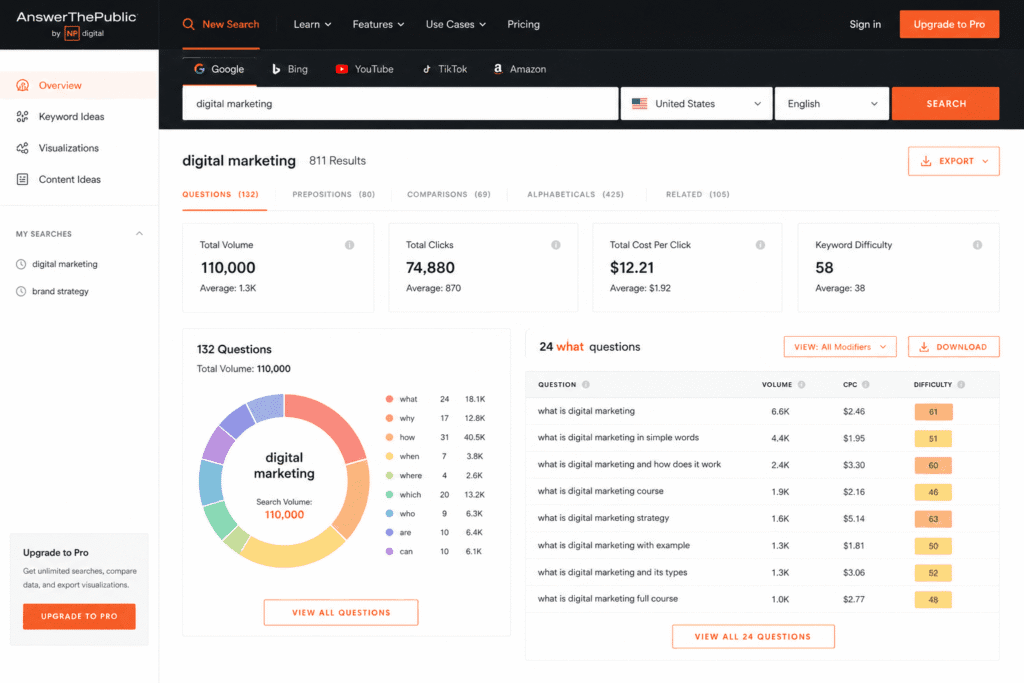
These question clusters are perfect for FAQ sections, listicle subheadings, and "People Also Ask" targeting.
Key Features
- Question Queries — What, why, how, where, when, and which questions around any keyword.
- Preposition Queries — Queries using "for," "with," "without," "near," and "like."
- Comparison Queries — X vs. Y and X or Y queries.
- Alphabetical Suggestions — A–Z autocomplete results per seed keyword.
- Data Export — CSV export of all keyword ideas.
- Search Listening Alerts — Monitor changes in how people search for your topic over time.
Pros and Cons
| ✅ Pros | ❌ Cons |
|---|---|
| Unique visual format makes patterns obvious | Free plan limits to 3 searches/day |
| Excellent for FAQ and "People Also Ask" targeting | No search volume data on free plan |
| Great for content angle ideation | No keyword difficulty scores |
| Data sourced directly from autocomplete | Limited filtering options vs. paid keyword tools |
| Useful for voice search and conversational queries | Paid plan needed for full volume data |
Best for: Bloggers writing FAQs, how-to guides, and question-based content targeting featured snippets.
On-Page SEO & Content Optimization Tools
Writing great content is only half the job. These tools ensure your content is structured, covers the right semantic territory, and signals expertise to search engines.
9. Surfer SEO
Surfer SEO analyses the top 20 ranking pages for your keyword and tells you exactly what your content needs to match them. It uses Natural Language Processing (NLP) to identify every entity, term, and structural pattern that winning content shares.
Overview
Surfer SEO works as a content editor. You enter your target keyword, and it generates a real-time brief: recommended word count, headings to include, NLP terms to use, and a live content score that updates as you write.
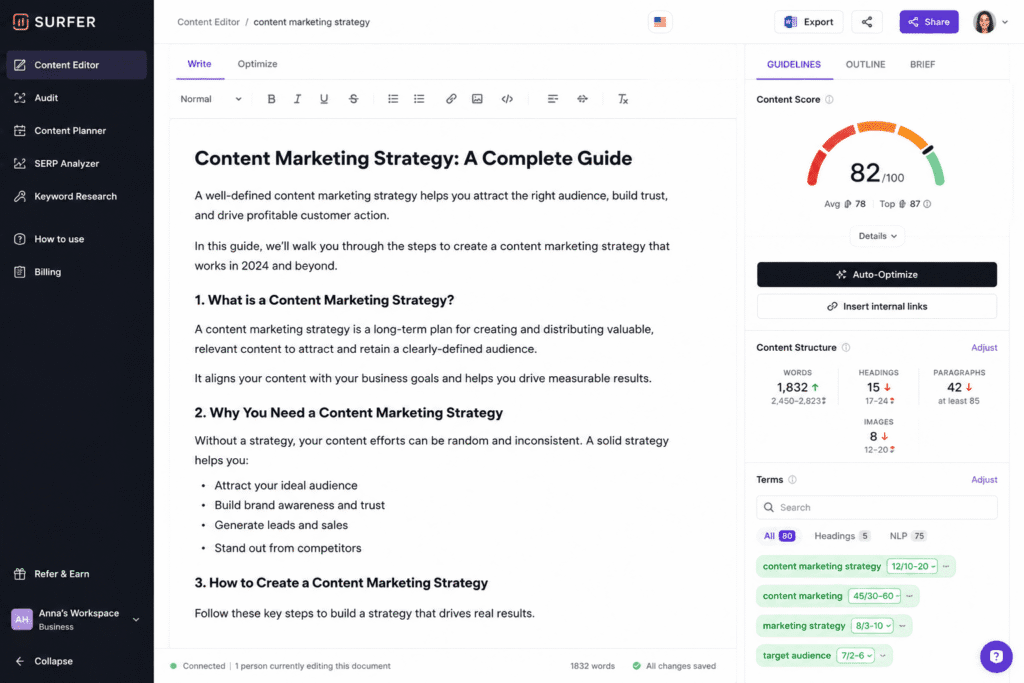
It integrates with Google Docs, WordPress, and Jasper AI, making it easy to fold into any writing workflow.
Key Features
- Content Editor — Live NLP-driven scoring as you write, with term frequency recommendations.
- SERP Analyzer — Breaks down every ranking page by word count, keyword density, headings, and backlinks.
- Content Audit — Identifies existing posts that need optimisation to recover or boost rankings.
- Keyword Research — Topical clustering to map related keywords to individual posts.
- AI Outline Generator — Auto-generates H2/H3 structure based on SERP analysis.
- Google Docs & WordPress Integration — Optimize inside the tools you already use.
Pros and Cons
| ✅ Pros | ❌ Cons |
|---|---|
| Real-time content scoring is genuinely actionable | No free plan |
| NLP-based recommendations reflect modern Google | Expensive for solo bloggers |
| Google Docs integration fits seamlessly into workflow | Can lead to over-optimization if followed too rigidly |
| Content Audit finds quick-win improvement opportunities | Keyword research is basic vs. Semrush |
| Strong for competitive niches where depth matters | Requires discipline to use efficiently |
Best for: Bloggers targeting competitive keywords where semantic depth and content structure are decisive ranking factors.
10. NeuronWriter
NeuronWriter delivers Surfer SEO-level content optimization at a fraction of the price. It's the best value on-page optimization tool for bloggers on a budget.
Overview
NeuronWriter uses semantic models, SERP analysis, and competitor content data to suggest which phrases, entities, and topics to include in your article. It also generates AI-assisted outlines and drafts, and integrates with WordPress and Google Search Console.
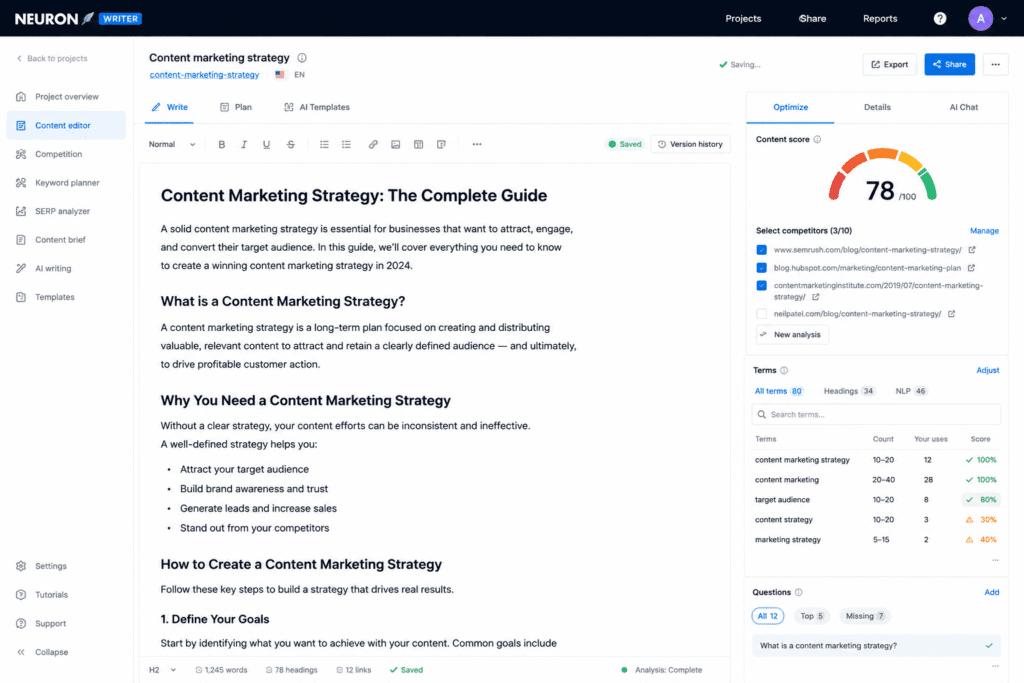
Rated 4.9/5 on both Capterra and AppSumo, it's particularly popular with bloggers who need high-quality content optimization without a premium subscription.
Key Features
- Content Optimization Editor — NLP-based term suggestions with frequency targets derived from SERP analysis.
- AI Writing Assistant — Generates article outlines, paragraphs, and meta descriptions.
- Competitor Content Analysis — Analyses the structure and semantic coverage of the top 30 results.
- Internal Linking Suggestions — Recommends which existing posts to link from new content.
- Google Search Console Integration — Pulls your actual ranking data into the optimization workflow.
- WordPress Plugin — Publish and optimize without leaving your CMS.
Pros and Cons
| ✅ Pros | ❌ Cons |
|---|---|
| Lowest price point for true NLP optimization | Smaller feature set than Surfer SEO |
| WordPress integration is seamless | AI writing quality requires manual editing |
| Internal linking suggestions save time | Interface less polished than Surfer |
| GSC integration ties optimization to real data | Learning curve for the query research module |
| High user satisfaction on review platforms | Limited rank tracking features |
Best for: Bloggers who want Surfer-quality content optimization at a budget-friendly price.
11. SEOBoost
SEOBoost automates content brief creation and on-page optimization using live SERP data. It tells you exactly which terms appear in top-ranking articles that are missing from yours.
Overview
SEOBoost analyses top-ranking content for your target keyword and generates a full content brief: suggested headings, recommended NLP terms, target word count, and entities to mention. Its Content Brief Editor alone replaces hours of manual SERP research per article.
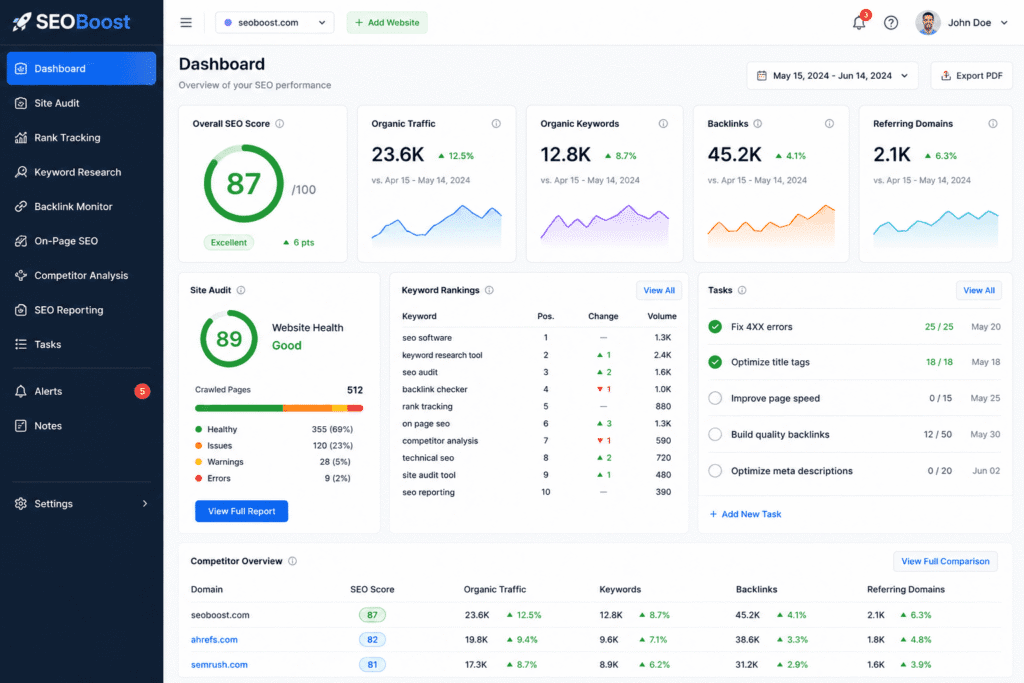
Once your draft is written, the Content Optimization tool scores it against the top 10 results and flags specific gaps to close.
Key Features
- Content Brief Generator — Automated briefs with headings, terms, and structure from real SERP data.
- Content Optimization Tool — Scores drafts and identifies missing keywords and weak sections.
- Content Management System — Built-in calendar and campaign planner for teams.
- Competitor Content Benchmarking — Side-by-side comparison of your content vs. top results.
- Topic Research — Finds subtopics and related questions Google considers relevant to your keyword.
Pros and Cons
| ✅ Pros | ❌ Cons |
|---|---|
| Content brief generator saves significant research time | No free plan |
| Recommendations are specific — not vague generic advice | Smaller brand than Surfer or NeuronWriter |
| Excellent for managing high-volume content calendars | Limited backlink or rank tracking features |
| Affordable entry price | Interface can feel basic vs. premium tools |
| Brief editor improves consistency across team content | Less data breadth than all-in-one platforms |
Best for: Bloggers who publish frequently and want to standardize content quality with data-backed briefs.
12. RankMath
RankMath is the most capable free WordPress SEO plugin available. It handles title tags, meta descriptions, schema markup, sitemaps, and on-page scoring — all inside the WordPress editor.
Overview
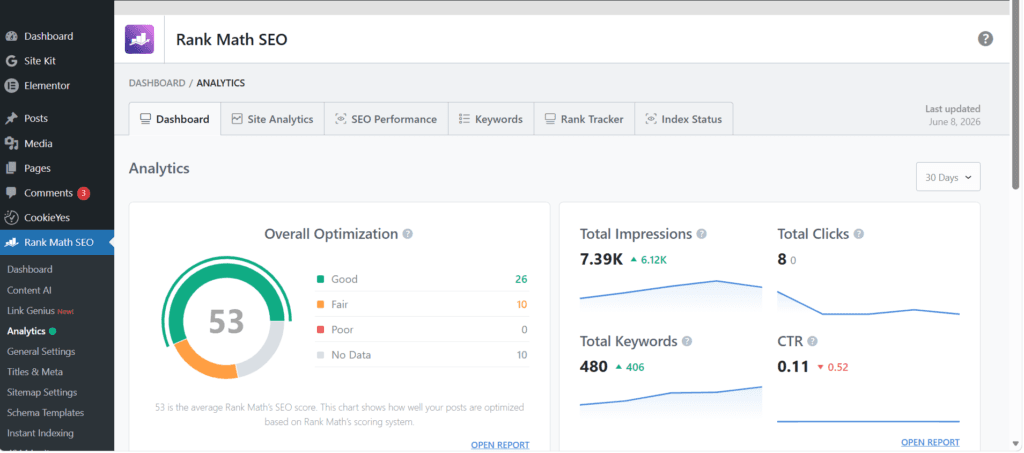
RankMath has quickly become the preferred WordPress SEO plugin for many professional bloggers, thanks to its generous free tier and detailed on-page scoring. Its setup wizard walks you through connecting Google Search Console and Analytics during installation.
Key Features
- On-Page SEO Score — Real-time checklist and score as you write in the WordPress editor.
- Schema Markup — Adds FAQ, HowTo, Article, Product, and 20+ schema types — including FAQ schema that earns rich results.
- XML Sitemap — Auto-generated and updated with every new post.
- Redirect Manager — Manage 301 redirects without a separate plugin.
- 404 Monitor — Logs broken link errors for quick fixing.
- Search Console Integration — Shows GSC data (clicks, impressions, position) directly in the WordPress dashboard.
- Keyword Rank Tracking — Built-in position tracking for target keywords.
Pros and Cons
| ✅ Pros | ❌ Cons |
|---|---|
| Extremely powerful free version | WordPress-only (no use for non-WP bloggers) |
| Schema markup for FAQ rich results is excellent | Free plan has limits on advanced schema types |
| GSC integration is built in — no separate setup | Occasional compatibility issues with page builders |
| Redirect manager replaces a separate plugin | Large plugin — can slow admin slightly |
| Onboarding wizard is beginner-friendly | Some advanced features require pro upgrade |
Best for: WordPress bloggers at any level who want robust on-page SEO without paying for a standalone tool.
13. Yoast SEO
Yoast SEO is the most widely trusted WordPress SEO plugin with over a decade of reliability. Its traffic-light scoring system makes on-page optimization immediately understandable for beginners.
Overview
Yoast SEO has been the standard WordPress SEO plugin since 2010. Its strength is approachability — the red/amber/green feedback system guides bloggers through optimizing each post without requiring prior SEO knowledge.
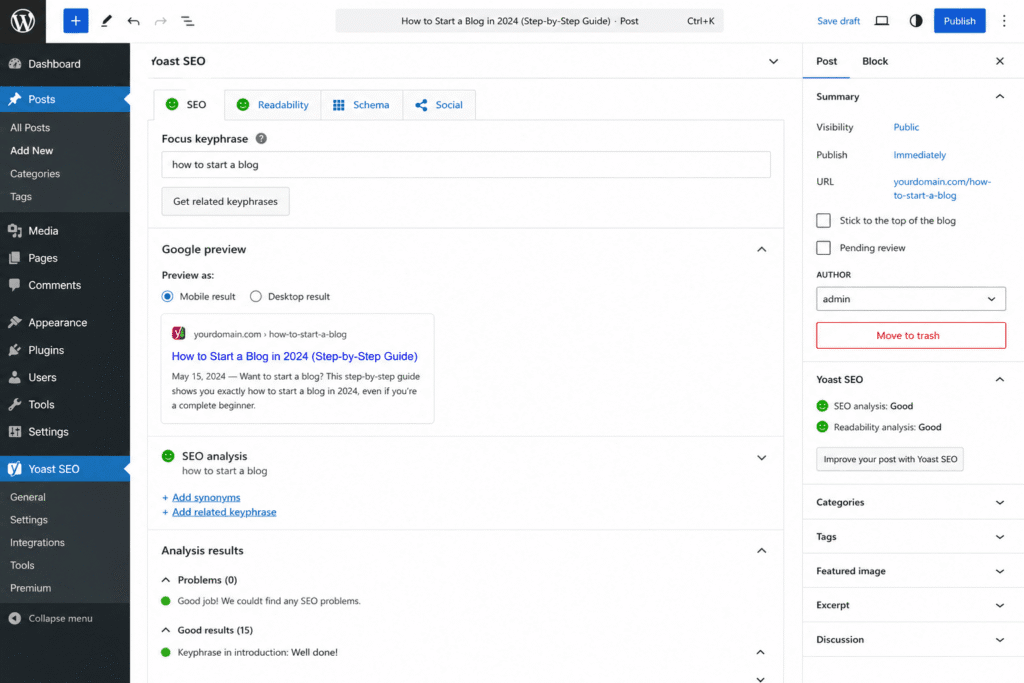
Yoast also provides in-plugin educational content, explaining the reasoning behind every recommendation as you work.
Key Features
- Readability Analysis — Flesch reading score, sentence length, passive voice usage, and transition word checks.
- SEO Analysis — Keyword focus optimization with clear improvement suggestions.
- Social Preview — Preview and customize how posts appear when shared on Facebook and Twitter.
- Schema Markup — Automatic article, breadcrumb, and organization schema.
- Cornerstone Content — Flag your most important posts for special optimization attention.
- Internal Linking Suggestions — Recommends related posts to link from within the editor.
- Redirect Manager — Premium feature for managing URL changes cleanly.
Pros and Cons
| ✅ Pros | ❌ Cons |
|---|---|
| Best-in-class onboarding for beginners | Some advanced features behind premium paywall |
| Readability scoring improves content quality | Free version limits some schema types |
| Decade-long track record of reliability | RankMath's free tier is more feature-rich |
| Extensive learning resources built into the plugin | Can over-optimize for keyword density signals |
| Social preview feature is uniquely practical | Plugin size can affect WordPress load time |
Best for: Beginner and intermediate WordPress bloggers who prioritize learning SEO as they grow.
Technical SEO Tools
Technical SEO issues — broken links, slow pages, crawl errors — suppress your rankings silently. These tools find and fix them.
14. Screaming Frog SEO Spider
Screaming Frog crawls your entire blog the way Google's bot does. It's the definitive technical SEO audit tool for bloggers who want to find every issue in one pass.
Overview
Screaming Frog is a desktop application that crawls every URL on your site and reports every technical SEO issue it finds: broken links, redirect chains, duplicate title tags, missing meta descriptions, unoptimized images, thin content pages, and canonicalization errors.
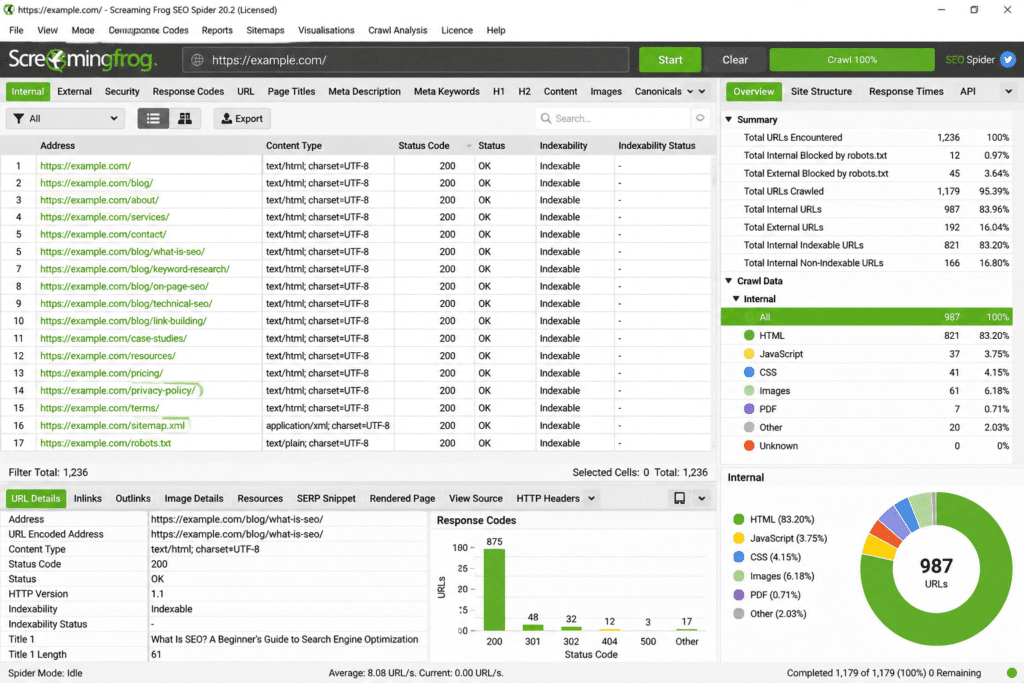
The free version crawls up to 500 URLs — sufficient for most bloggers. The paid version removes all limits and adds JavaScript rendering, scheduled crawls, and GA4 integration.
Key Features
- Full Site Crawl — Finds broken links (404s), redirect chains, and orphaned pages.
- On-Page Element Analysis — Flags missing, duplicate, or over-long title tags and meta descriptions.
- Image Optimization — Identifies large images, missing alt text, and broken image sources.
- Duplicate Content Detection — Flags pages with identical or near-identical content.
- Canonical Tag Audit — Ensures canonical tags are set correctly across your site.
- Custom Extraction — Scrape any on-page element using XPath or regex.
- GA4 & Search Console Integration — Connects performance data to crawl data for prioritisation.
Pros and Cons
| ✅ Pros | ❌ Cons |
|---|---|
| Most comprehensive technical audit available | Desktop app — not cloud-based |
| Free version covers most blogger-scale sites | Steep learning curve for beginners |
| Highly customizable with custom extraction | Windows/Mac only (no Linux GUI) |
| Regular updates with new SEO checks added | Paid version is an annual licence |
| Trusted by professional SEOs worldwide | Outputs require interpretation — not beginner-friendly |
Best for: Bloggers doing a serious site-wide technical audit, especially after a migration or CMS change.
15. TopicRanker
TopicRanker uses AI-powered SERP analysis to find keywords where your competitors are weakest. It surfaces "golden" opportunities where low-authority pages currently hold top-10 positions.
Overview
TopicRanker analyses bulk SERP data and identifies keywords where the current top 10 results have specific weaknesses: low domain authority, thin content, poor backlink profiles, or outdated information. These are keywords a newer or smaller blog can realistically displace.
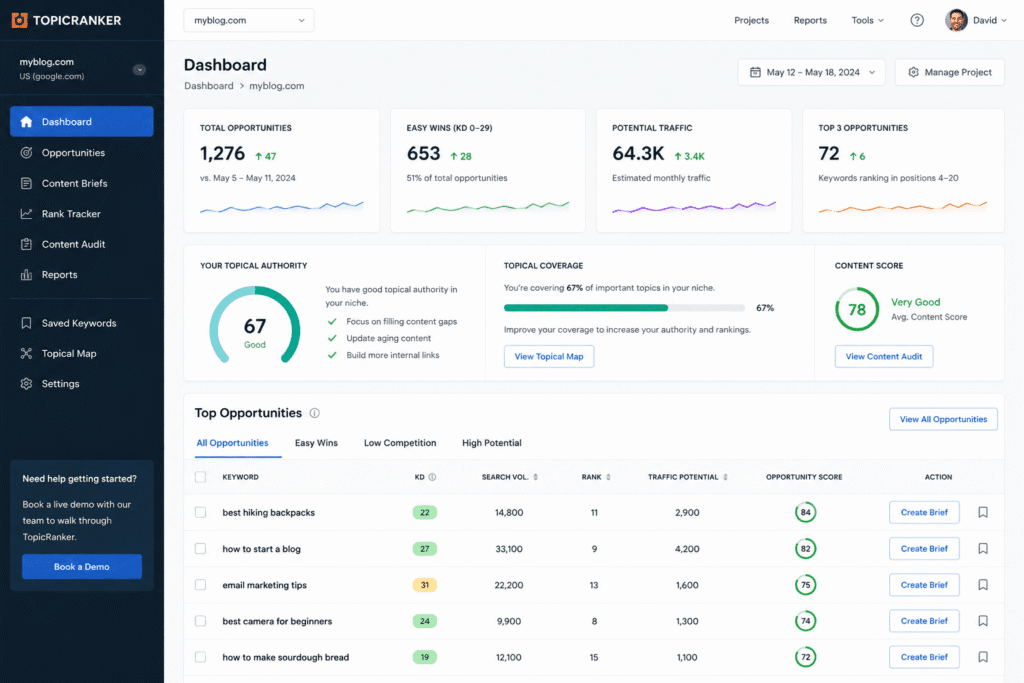
It removes a common beginner mistake — targeting keywords based purely on volume without checking whether the current results are beatable.
Key Features
- Weak SERP Detection — Flags keywords where low-authority sites are ranking in the top 10.
- Bulk SERP Analysis — Processes hundreds of keyword opportunities simultaneously.
- Opportunity Scoring — Ranks keywords by how achievable ranking improvement is.
- Niche-Specific Suggestions — Tailored keyword ideas based on your blog's topic and existing content.
- Competitor Weakness Reports — Identifies specific ranking page problems (thin content, low backlinks, etc.).
Pros and Cons
| ✅ Pros | ❌ Cons |
|---|---|
| Eliminates unwinnable keyword choices before writing | Higher price point for a specialist tool |
| Saves hours of manual SERP-by-SERP evaluation | Narrow focus — not an all-in-one platform |
| Especially valuable for new blogs with low authority | Less useful for established blogs with strong DA |
| Surfaces opportunities most tools miss | Smaller brand with less community support |
| Reduces wasted content production | Limited keyword data volume vs. Semrush |
Best for: New bloggers who need quick organic wins without an established backlink profile.
How to Choose the Right SEO Tool for Your Blog
The right tool depends on your blog stage, budget, and primary need.
By Blog Stage
New blogger (0–6 months): Start with Google Search Console, Google Analytics 4, and RankMath or Yoast on WordPress. Use KWFinder's free tier for keyword research and Answer the Public for content ideas. Total cost: £0.
Growing blogger (6 months–2 years): Add a paid keyword research tool (KWFinder at $29/mo is ideal) and a content optimizer (NeuronWriter at $23/mo). Run a Screaming Frog audit every quarter. Total cost: ~$52/mo.
Established blogger (2+ years, monetised): Invest in Semrush or Ahrefs plus Surfer SEO. The data depth at this stage is essential for competing in higher-difficulty niches. Total cost: ~$218–$229/mo.
By Primary Need
| Your main challenge | Best tool to solve it |
|---|---|
| Don't know which keywords to target | KWFinder or Semrush Keyword Magic Tool |
| Content doesn't rank despite publishing | Surfer SEO or NeuronWriter |
| Can't find winnable opportunities | TopicRanker |
| Don't know if Google indexes your posts | Google Search Console |
| WordPress SEO is confusing | RankMath (free) |
| Technical issues suppressing rankings | Screaming Frog |
| Don't understand your traffic behavior | Google Analytics 4 |
Final Verdict
The best SEO stack for most bloggers in 2025:
- Free: Google Search Console + Google Analytics 4 + RankMath
- Budget ($50–80/mo): Add KWFinder + NeuronWriter
- Growth ($150–230/mo): Semrush or Ahrefs + Surfer SEO
Start with the free tools. Build the habits. Add paid tools when you have enough content to optimize and enough revenue to justify the investment.
The best SEO tool is the one you use consistently — not the most expensive one.
Related Articles
AI Tools
Google Tools
10 Free Google Tools Every Content Creator Needs
SaaS Tools
10 Top SaaS Tools for Startups to Save Time, Reduce Costs, and Grow Faster in 2026