
How to Integrate SEO into Content (Step-by-Step for Beginners That Actually Works in 2026)

Table of Contents
- Why Most Content Never Gets Found on Google
- What It Means to Integrate SEO Into Content
- The SEO‑First Mindset (Where Everything Starts)
- Step-by-Step: How to Integrate SEO Into Your Content
- Step 1: Start With Keyword Research
- Step 2: Understand Search Intent
- Step 3: Choose the Right Content Format
- Step 4: Build Your Content Structure (SEO Blueprint)
- Step 5: Write for People, Optimise for Google
- Step 6: Add Internal and External Links
- Step 7: Optimise Your Technical On-Page Elements
- Step 8: Distribute and Promote
- Quick SEO Content Checklist (Before You Hit Publish)
- Real Example: A Blog Post Built the Right Way
- Common Content + SEO Mistakes to Avoid
- Key takeaway
- Frequently Asked Questions
- What to Read Next
1. Why Most Content Never Gets Found on Google
Here is the reality most marketers don’t want to admit:
Over 90% of content published online gets zero organic traffic from Google. (Ahrefs, 2023)
Not a little traffic. It’s zero.
That means 9 out of every 10 blog posts, landing pages, and articles published online are basically invisible.
Why?
Not because the writing is bad.
Not because the topic is boring.
It’s because they were created without SEO in mind. You had a great idea, researched it well, hit publish—and then nothing happened, because nobody was actually searching for what you wrote.
This guide fixes that.
By the time you finish reading, you will know exactly how to integrate SEO into every piece of content you create, so your articles are found, read, and ranked—not just written.
Here is what you will learn:
- The SEO-first mindset that changes how you approach every article
- An 8-step process for building SEO into your content from the start
- A pre-publish checklist so nothing gets missed
- The most common mistakes and how to skip them entirely
2. What It Means to Integrate SEO Into Content
Most people think “SEO content” means stuffing keywords into sentences. It does not.
Integrating SEO into your content means using search data to make smarter decisions at every stage of the writing process, from choosing your topic to structuring your article to writing your title and description.
It is not a layer you add at the end. It is a lens you use from the beginning.
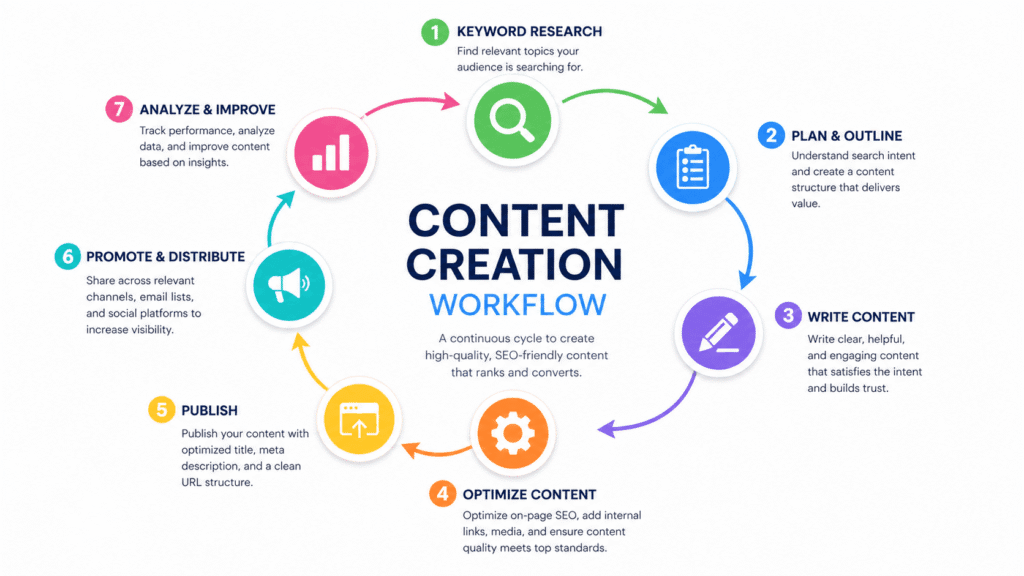
When SEO is integrated into your content:
- You choose topics people are actually searching for — not just what you feel like writing about
- You write in the format people expect — a tutorial, a list, a comparison, based on what Google already shows for that keyword
- You structure your article so Google understands it — with clear headings, logical flow, and descriptive links
- You connect your content to the rest of your site — through internal links that build authority across every page
The result?
Content that ranks, Content that gets read, and Content that grows your business.
If you’re new to SEO integration, start here:
What Is Integrated SEO? A Beginner’s Guide →
3. The SEO‑First Mindset (Where Everything Starts)
If your content isn’t ranking, the problem usually starts here—with how you decide what to write.
Most people do this:
“I want to write about productivity tips for remote workers.”
Write it → add keywords → publish → get 12 visits in 3 months.
This is the old approach (SEO-last). It puts the writer first and the reader last.
Here’s the New approach (SEO-first):
“What is my audience actually searching for around remote work?”
You find that “best productivity apps for remote teams” gets about 1,800 searches per month with a KD of 18.
You write the article around that exact demand.
You rank on page 1 within 8 weeks → 400 visits per month, consistently.
Same effort.
Completely different outcome.
The SEO-first mindset has three rules:
- No topic without a keyword
Every piece of content starts with a keyword that has proven search demand
- No keyword without intent
Before writing, you understand why someone is searching for that term
- No content without a destination
Every article connects to your broader content architecture through internal links
Adopt these three rules and your entire content operation changes.
4. How to Integrate SEO Into Your Content: The 8‑Step System
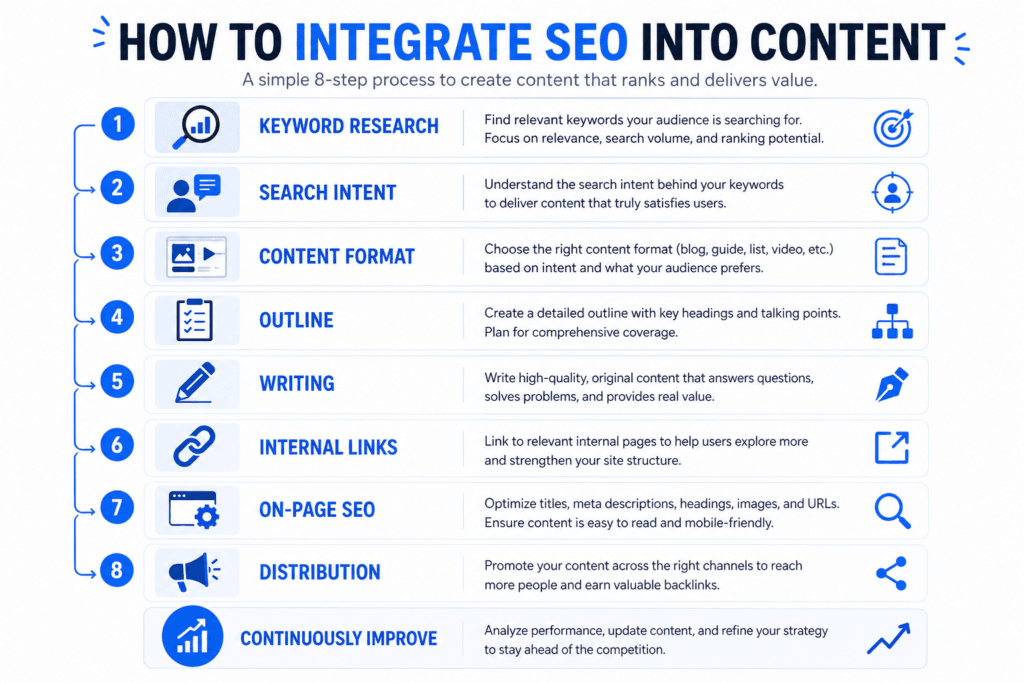
High‑ranking content sites use a system like this. Here’s the exact process you can follow.
Step 1: Start With Keyword Research

Before you write a single word, find out what people are actually searching for.
How to do it:
- Open a keyword research tool (Semrush, Ahrefs, or the free Google Keyword Planner)
- Type in your general topic, for example, “content marketing.”
- Look at the keyword suggestions, questions, and related terms
- Focus on keywords that match all three
| Criteria | What to Look For |
| Relevant | Tied to your audience and business |
| Achievable | KD under 30 if you’re just starting out |
| Valuable | Decent monthly search volume (200–500+ is meaningful for niche topics) |
What to prioritize:
- Short-tail keywords (1–2 words, e.g., “content strategy”) → high volume, high competition — save for later
- Long-tail keywords (3–6 words, e.g., “how to create a content strategy for beginners”) → lower volume, and lower competition
- Question keywords (e.g., “how do you integrate SEO into your content”) → excellent for featured snippets and voice search
Pro tip: Long-tail keywords are easier to rank for, and they attract more qualified readers, people who know exactly what they want and are closer to making a decision.
Step 2: Understand Search Intent
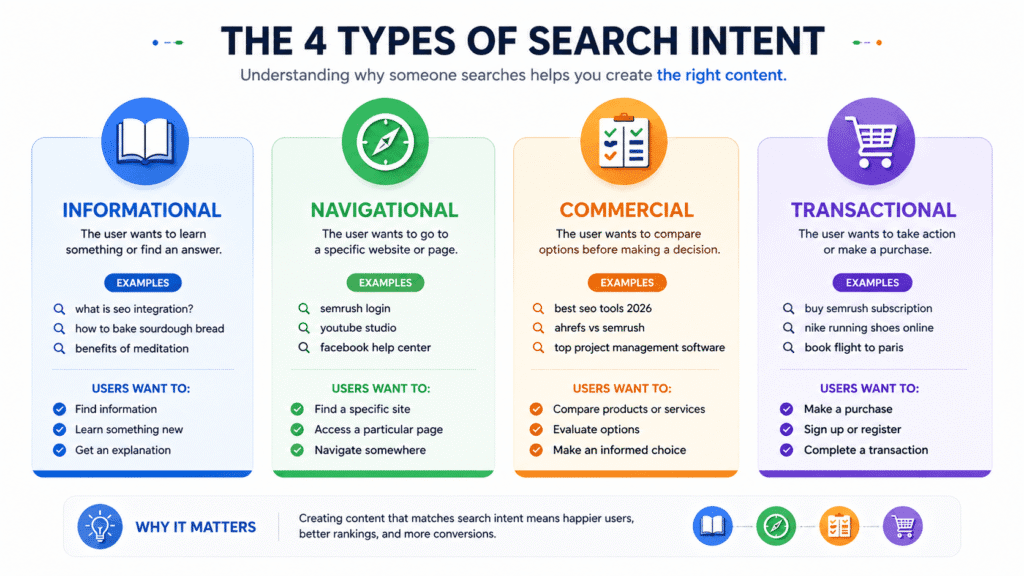
Once you have your keyword, do not start writing yet.
First, ask: Why is someone typing this into Google?
There are four types of search intent:
| Intent | What They Want | Example Keyword |
| Informational | To learn something | “What is SEO integration?” |
| Navigational | To find a specific site | “Semrush login” |
| Commercial | To compare options before buying | “Best SEO tools 2026” |
| Transactional | To buy or sign up | “Buy a Semrush subscription.” |
How to check intent in 30 seconds:
Google your target keyword. Look at the top 5 results. Are they blog posts? Product pages? Videos? Comparisons?
Whatever format dominates the top results is what Google has decided your audience wants. Your content needs to match that format, or it simply won’t rank, no matter how good it is.
Step 3: Choose the Right Content Format
Now you know the intent—so pick the matching format.
Informational intent use:
- Ultimate guides and how-to articles
- Explainers and definition posts
- Tutorials with step-by-step instructions
Commercial intent use:
- Tool roundups and comparison posts (“X vs Y”)
- “Best of” listicles
- Review articles
Transactional intent use:
- Landing pages and sales pages
- Product or service pages
- Free trial or demo pages
Getting the format wrong is one of the most common and most damaging SEO mistakes. A beautiful long-form guide targeting a transactional keyword will not rank. A short sales page targeting an informational keyword will not rank. Format equals intent.
Step 4: Build Your Content Structure
Before you open a blank document, create a content blueprint—an outline that tells you exactly what the article needs to cover.
How to build your blueprint:
- Google your primary keyword — note the H2 headings competitors use in their top-ranking articles
- Check the “People Also Ask” box — these are the related questions your article should answer
- Look at “Related Searches” at the bottom of the page — more subtopics to consider
- Use a content optimisation tool (like Surfer SEO or Clearscope), these show you the exact topics, terms, and structure your article needs to compete
Your blueprint should include:
- H1 (Title): Contains your primary keyword
- Introduction: Hook + why it matters + what they will learn
- H2 sections: Each one covering a major subtopic or question
- H3 sections: Specific points within each H2
- FAQ section: Covers at least 4–5 related questions
- Conclusion / CTA: Summary + next steps or internal links
A clear structure does two things: it helps the reader navigate easily, and it helps Google understand exactly what your content covers.
Step 5: Write for People, Optimise for Google
Now it’s time to write. Follow one golden rule: write for your reader first. Google will follow.
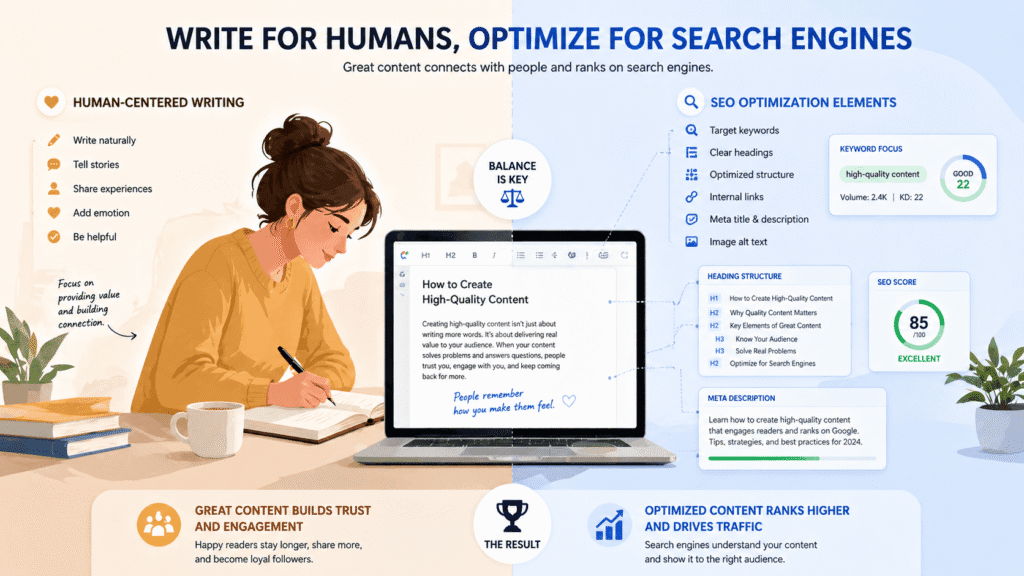
Google’s algorithm has become extraordinarily good at understanding quality. It rewards content that is:
- Clear and easy to read — short paragraphs, plain language, no unnecessary jargon
- Genuinely helpful — actually answers the question in full, not just around it
- Well-structured — uses headings, bullets, and bold text to make scanning easy
- Original — says something new, uses real examples, reflects genuine experience
Keyword placement (the natural way):
| Location | What to do |
| H1 Title | Include your primary keyword exactly, or very close to it. |
| First 100 words | Mention the primary keyword naturally in the intro. |
| H2 and H3 | Use keyword variations and related terms. |
| Body paragraphs | Use the keyword and related terms naturally, aiming for about 1–2% density. millionify |
| Image alt text | Describe the image using relevant keywords. |
| Conclusion | Reinforce the primary keyword once more. |
Do not:
- Force keywords into sentences where they sound unnatural
- Repeat the same keyword over and over
- Write thin content just to hit a word count
Do:
- Use synonyms and natural variations (“SEO content strategy,” “search-optimised content,” “content with SEO built in”)
- Write as if you are explaining to a smart, confident, clear, helpful friend
Step 6: Add Internal and External Links
Links are the connective tissue of integrated SEO. Do not skip this step.
Internal links (links to other pages on your site):
- Add 3–5 internal links per article
- Link to your pillar page and to relevant cluster articles
- Use descriptive anchor text, e.g., “complete guide to SEO integration,” not “click here.”
- Every time you publish something new, go back to older articles and add links pointing to the new page
External links (links to other credible websites):
- Add 2–4 links to authoritative external sources such as Google, Semrush, Ahrefs, HubSpot, and academic studies
- External links signal to Google that your content is well-researched and trustworthy
- Only link to sites you trust. Low-quality external links can hurt your credibility
A quick rule of thumb:
Every article should answer a question so fully that the reader has no reason to leave, but should also show them where to go next with your internal links.
Step 7: Optimise Your Technical On-Page Elements
Once your article is written, go through this technical layer before publishing.
Title Tag (what appears in Google search results):
- Include your primary keyword near the start
- Keep it under 60 characters
- Make it compelling, give people a reason to click
- Example: “How to Integrate SEO Into Your Content (Step-by-Step Guide for 2026).”
Meta Description (the summary under your title in search results):
- Include your primary keyword naturally
- Keep it under 155 characters
- Write it like a mini ad. What will the reader gain from clicking?
- Example: “Want your content to actually rank on Google? Learn exactly how to integrate SEO into every piece of content you create with simple steps and real examples.”
URL / Slug:
- Short and keyword-rich
- Use hyphens between words, never underscores
- Example: /how-to-integrate-seo-into-content
Images:
- Compress all images before uploading (use TinyPNG or Squoosh — both free)
- Add descriptive alt text to every image that includes a relevant keyword
- Use a descriptive file name — seo-content-integration-steps.png, not IMG_4821.png
Heading hierarchy:
- Only one H1 per page (your title)
- Use H2 for major sections, H3 for sub-sections within them
- Never skip levels (don’t go from H2 straight to H4)
Step 8: Distribute and Promote
Publishing is not the finish line. It is the starting line.
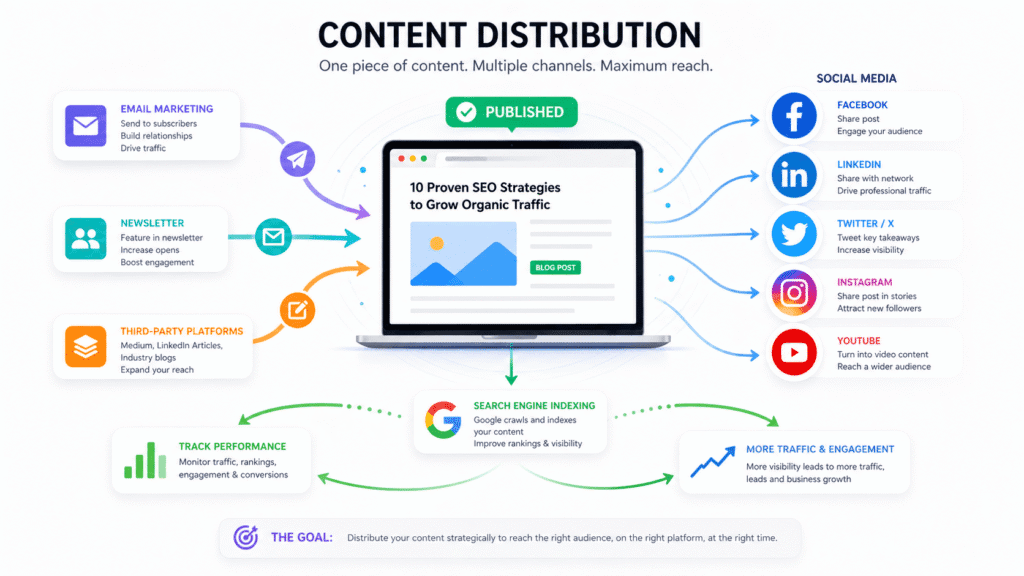
On publish day, do all of these:
- Email your list — even a small list of 500 people creates real traffic on day one
- Share on social media — post 3–5 insights from the article across your active platforms
- Submit to Google Search Console — paste your URL into the “URL Inspection” tool and request indexing
- Add internal links from older pages — find 2–3 existing articles on your site and link to this new one
In the first 30 days after publishing:
- Monitor your Search Console to see which queries are triggering your page
- Check if you are ranking anywhere in the top 50. If so, optimise to climb higher
- Look at user behaviour in GA4 — is the bounce rate very high? If so, improve the introduction
5. Quick SEO Content Checklist (Before You Hit Publish)
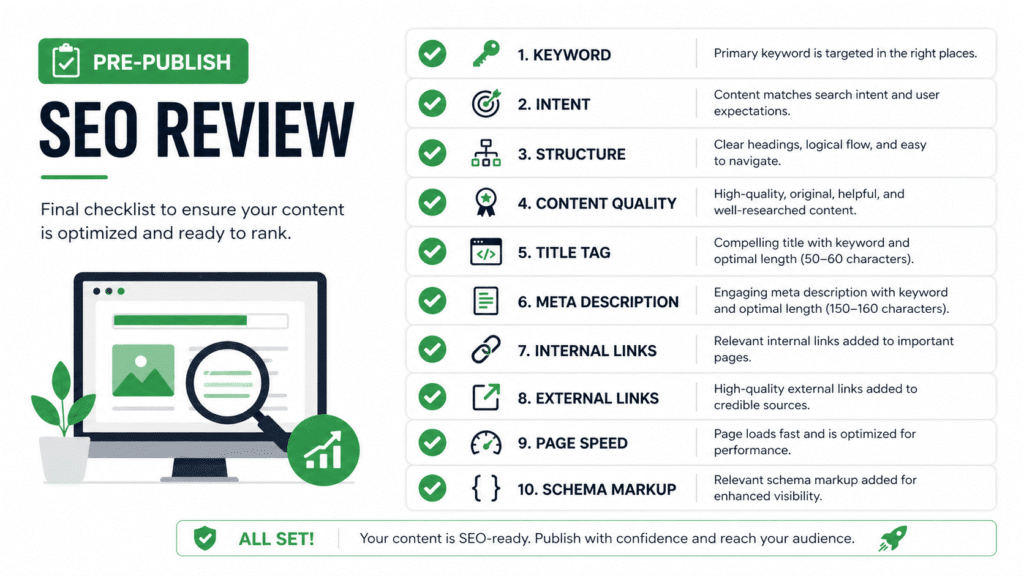
Use this every time before publishing any piece of content.
Keyword & Intent
- Primary keyword confirmed with search volume data
- Search intent verified (informational/commercial / etc.)
- Content format matches what is ranking (guide, list, tutorial, etc.)
Structure
- One H1 that includes the primary keyword
- H2 and H3 headings are clear and logical
- Table of contents included (for long articles)
- Introduction hooks the reader and states what they will learn
Content Quality
- Covers the topic fully — no major subtopics missed
- Short paragraphs (max 3 lines each)
- Real examples or scenarios included
- Data or statistics cited with sources
On-Page SEO
- Title tag: under 60 characters, includes keyword
- Meta description: under 155 characters, compelling
- URL: short, keyword-rich, hyphenated
- Primary keyword appears in the first 100 words
- Keyword used naturally in 2–3 H2 or H3 headings
- All images have alt text
Links
- 3–5 internal links to relevant pages (pillar + other clusters)
- 2–4 external links to authoritative sources
- All links open correctly (no broken links)
Technical
- Images compressed and optimized
- Page speed checked on mobile (PageSpeed Insights)
- Schema markup implemented (Article + FAQ if applicable)
Distribution (after publishing)
- URL submitted to Google Search Console
- Shared to email list
- Posted on social media
- Internal links added from 2–3 existing pages
6. Real Example: A Blog Post Built the Right Way
Let’s walk through a concrete, real‑world example step by step..
Business: A freelance graphic designer.
Goal: More clients find their website through Google
The old approach:
The designer writes a post called “My Top Design Tips” because they feel like sharing their experience. No keyword research. Good content, but nobody is searching for that exact phrase.
Result after 3 months:
- 28 visits.
- Zero enquiries from organic search.
The integrated SEO approach:
Step 1: Keyword research
They search Semrush and find “logo design tips for small business” has 320 monthly searches with a KD of 14. Perfect.
Step 2: Intent check
Google shows the top results are all list-style blog posts (“10 tips,” “7 tips”). That is the format to match.
Step 3: Format choice
They choose a listicle with 8–10 practical, specific tips and include examples from real client projects.
Step 4: Blueprint
They outline:
- H2 for each tip
- A FAQ section covering “how much should a logo cost?” and “how long does logo design take?” (both show up in “People Also Ask”)
Step 5: Writing
The tone is clear, jargon‑free, and conversational. Each tip includes a before‑after example from real client work. The primary keyword appears naturally in:
- The title
- The intro
- Two H2 headings
- The conclusion
Step 6: Links
Internal links to their portfolio page and services page. External links to Google Fonts and Canva as design resources.
Step 7: Technical
Title under 60 characters. Meta description written as a mini-pitch. Clean URL: /logo-design-tips-small-business.
Step 8: Distribution
Sent to their 400-person email newsletter on day one. Posted on LinkedIn and Instagram. Submitted to Search Console.
Result after 10 weeks:
- Ranking #6 for the primary keyword
- 290 organic visits per month
- 4 direct client enquiries attributed to organic search in the first month
Same designer. Same expertise. Just a different process.
7. Common Content + SEO Mistakes to Avoid
Writing for Google, not for people.
Keyword stuffing, robotic sentences, and content written to hit a keyword count. Google penalises all of this now. Write naturally. Use keywords as a guide, not a quota.
Targeting the same keyword on multiple pages.
This is called keyword cannibalisation. When two of your own pages compete for the same keyword, they split authority, and neither ranks well. One keyword equals one page.
Publishing thin content just to be consistent.
A 400-word article that barely scratches the surface of a topic will not rank, and it will damage your credibility. It is far better to publish one excellent 2,000-word article per month than four shallow ones per week.
Skipping the meta description.
If you do not write a meta description, Google will pull a random snippet from your page, often something that does not make sense out of context. Write it yourself. Every time.
Forgetting to update older content,
Articles that ranked on page 1 last year can slip to page 3 this year if they are never refreshed. Set a quarterly reminder to review your top-performing articles and update any outdated information, broken links, or statistics.
Not linking to your own content.
Every article is an opportunity to guide the reader deeper into your site. If you are not using internal links, you are leaving traffic and ranking power on the table.
8. Key takeaway
- SEO should be built into content from the start, not added at the end.
- Keyword research helps you choose topics people are already searching for.
- Search intent matters as much as the keyword itself.
- The content format must match what Google is already ranking.
- A clear structure with H1, H2, H3, and FAQ sections improves readability and SEO.
- Internal links and external links strengthen both user experience and authority.
- On-page elements like title tags, meta descriptions, URLs, and alt text still matter.
- Publishing is not the final step; promotion and content updates are part of SEO success.
- Good SEO content is written for people first, while still being easy for search engines to understand.
- The biggest mistake is treating SEO as an afterthought instead of part of the content strategy.
9. Frequently Asked Questions
How do you integrate SEO into your content?
What is SEO content writing?
How many keywords should I use in a blog post?
How often should I publish SEO content?
What is the difference between on-page SEO and content SEO?
10. What to Read Next
You now have the full process for integrating SEO into every piece of content you create. Here is where to go next:
- The Complete Guide to SEO Integration → — The pillar page for this entire series. Covers all 8 types of SEO integration, real examples, best tools, and a full FAQ. Your home base.
- What Is Integrated SEO? A Beginner’s Guide → — If you skipped the foundation, go back to Cluster 1. Understanding the why makes the how much easier to apply. (Cluster 1)
- SEO and Content Marketing Integration: The Complete Guide → — Ready to align your entire editorial calendar with search demand? This takes everything in this article and scales it to a full content marketing strategy. (Cluster 4)
- Best SEO Integration Tools in 2026 → — The exact tools that make keyword research, content optimisation, and performance tracking faster and more accurate. Includes free options. (Cluster 11)
- SEO and CMS Integration: WordPress, HubSpot & Beyond → — How to set up your CMS so SEO is built into the platform itself — URL structures, schema, speed, and more. (Cluster 8)
Sources & References
- Ahrefs — How Many Websites Get No Organic Traffic? (2023): https://ahrefs.com/blog/search-traffic-study/
- Google Search Central — Creating Helpful, Reliable, People-First Content: https://developers.google.com/search/docs/fundamentals/creating-helpful-content
- Semrush — Keyword Overview & Content Strategy Tools (2026): https://semrush.com
- HubSpot — The Ultimate Guide to SEO in 2026: https://hubspot.com/marketing/seo
- Backlinko — On-Page SEO: The Definitive Guide (2025): https://backlinko.com/on-page-seo
- Search Engine Journal — How to Write SEO Content That Actually Ranks (2025): https://searchenginejournal.com






One Comment