How to Integrate GEO With SEO: Local & Geographic SEO Guide (2026)
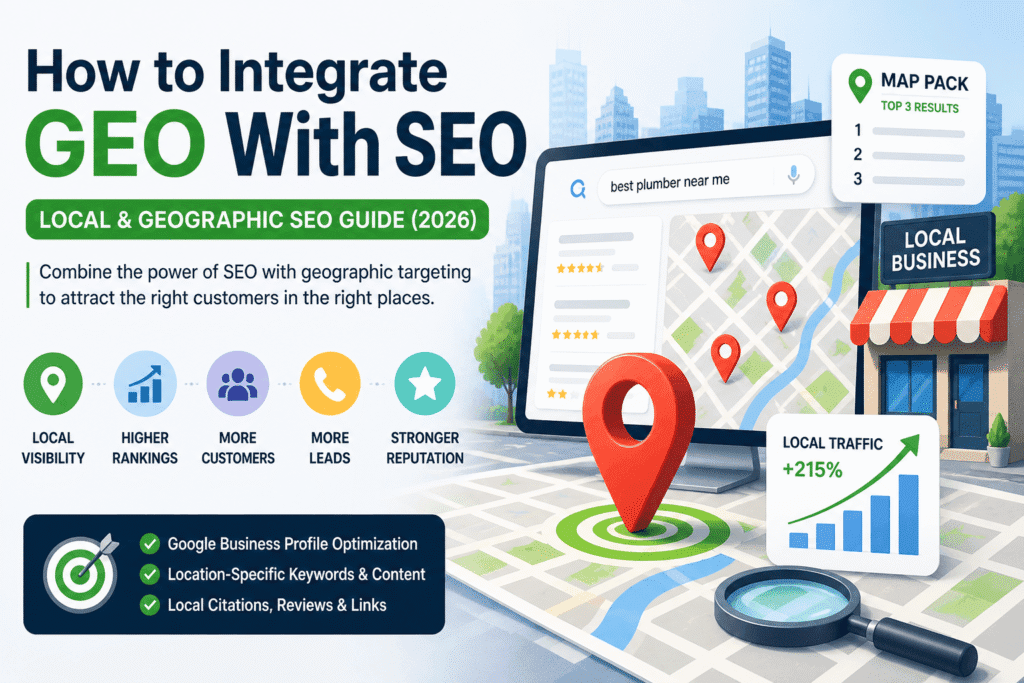
Table of Contents
- The Problem with Being Invisible Locally
- What Is GEO SEO Integration?
- Why GEO + SEO Is One of the Biggest Missed Opportunities in 2026
- GEO SEO vs. Standard SEO: What Is Different?
- The 6 Core Elements of GEO SEO Integration
- Step-by-Step: How to Integrate GEO With SEO
- Real Example: A Local Business That Got It Right
- Quick GEO SEO Checklist
- Common Mistakes to Avoid
- Frequently Asked Questions
1. The Problem with Being Invisible Locally
Imagine this: Someone in your city searches “best plumber near me”. You’re a highly skilled plumber with 10 years of experience, but your business doesn’t appear anywhere on the results page. Instead, three competitors show up in Google’s Map Pack at the top (with stars and reviews), and they get all the calls. You get nothing. This situation happens daily to many local businesses – not because their work is inferior, but because they have never integrated geographic targeting into their SEO strategy.
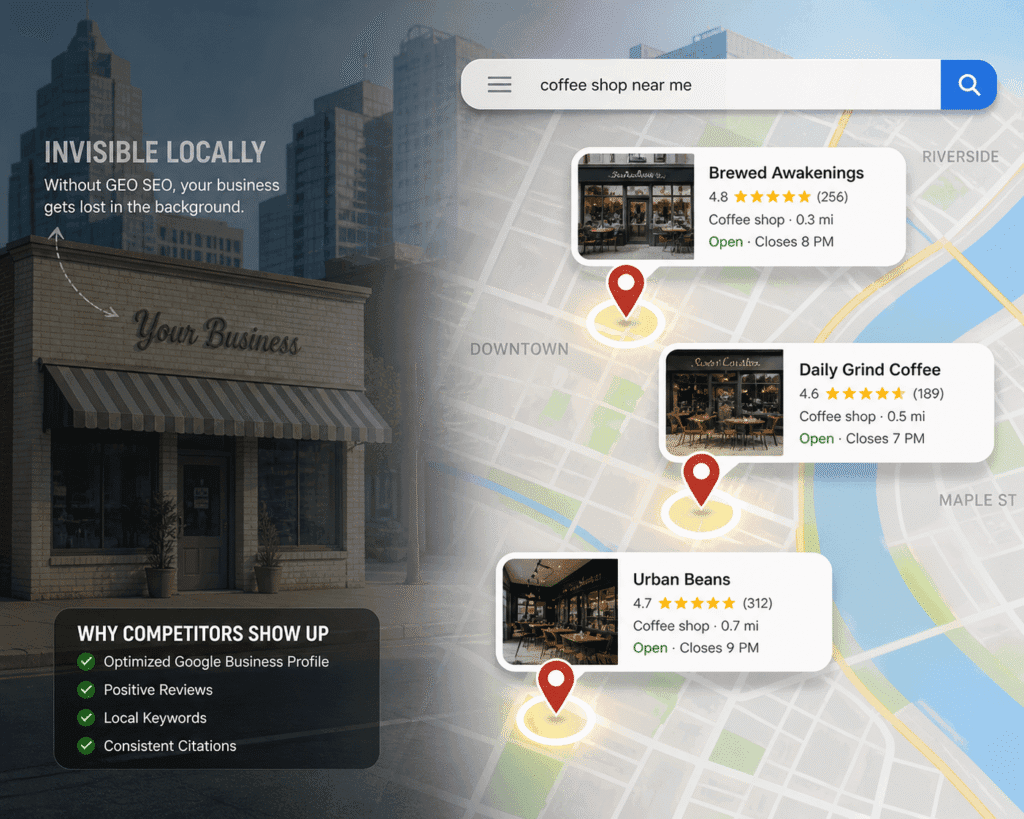
GEO (geographic) SEO integration fixes this. By tailoring your online presence to local searches, your business can capture nearby customers. The good news? This is a relatively low-competition area of SEO. More than half of small businesses neglect basic local steps (only ~44% have fully claimed their Google Business Profile[1]). By focusing on local signals, you put yourself ahead.
Key takeaways from this guide:
- Exactly what “GEO SEO integration” means and why it matters
- How to combine local targeting with your SEO strategy
- The six core elements you’ll need (GBP, location pages, citations, etc.)
- A clear step-by-step action plan
- A real-world example, checklist, FAQs, and additional resources
2. What Is GEO SEO Integration?
“GEO SEO integration” means combining your standard SEO strategy with geographic targeting, so your business appears in search results for people in specific locations. It stands for “Geographic SEO.” The “GEO” part refers to geography: cities, regions, neighborhoods, and countries. The “SEO” part refers to everything you already know: keywords, content, links, and technical setup.
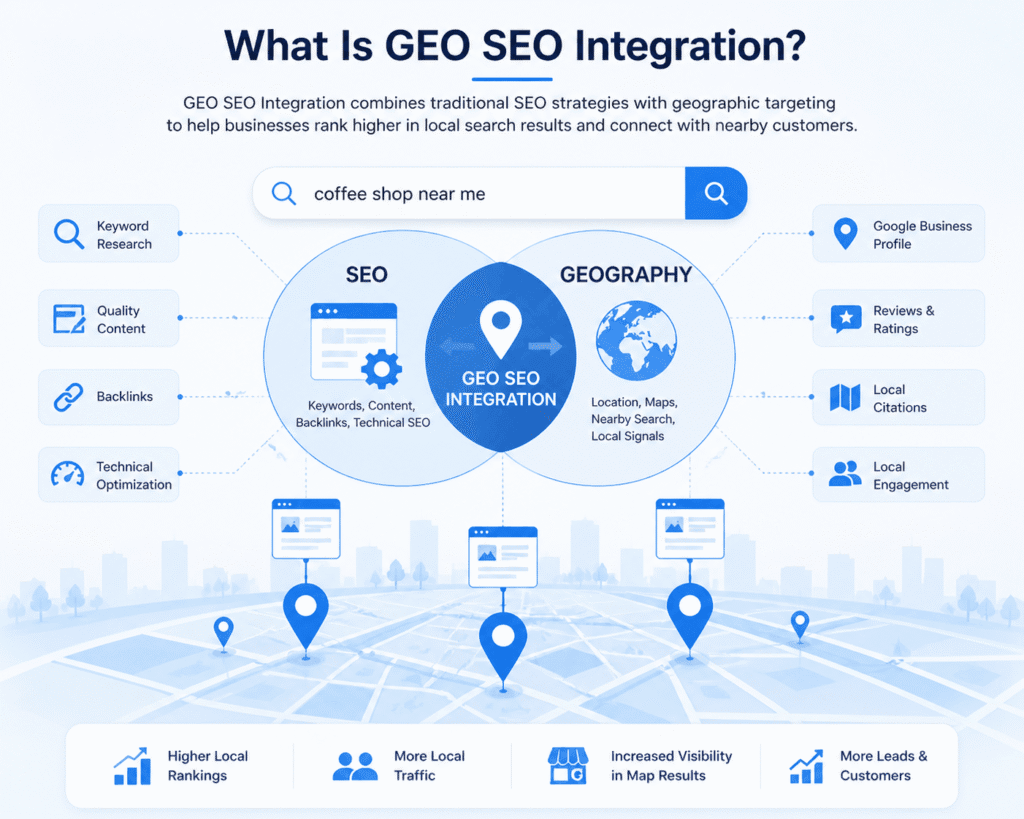
GEO SEO focuses on attracting traffic from specific geographic locations by aligning on-page content, metadata, and technical signals with local search behaviors
For example:
- Standard SEO example: Targeting the phrase “best coffee shop”.
- GEO SEO example: Targeting “best coffee shop in Edinburgh” or “coffee shop near Princes Street”.
In the second case, you attract people who are physically near your shop and looking to visit right away. GEO SEO focuses on location-based keywords, local listings, and signals that tell Google where your customers are. This typically involves:
- Optimizing for location-based keywords like city/neighborhood keywords (e.g., adding “Glasgow” or “West End” to content)
- Setting up and managing your Google Business Profile (GBP)[2]
- Creating location-specific landing pages
- Building consistent local citations (mentions of your Name, Address, Phone) on directories[3][2]
- Encouraging and managing local reviews (Google, Yelp, etc.)
- Earning local backlinks (from local news sites, partners, etc.)
- Targeting “near me” searches, which have exploded in recent years
GEO SEO means aligning every part of your online presence—keywords, content, links, and tech setup—with the locations you serve. In short: who you are, what you do, and where you do it.
New to SEO integration? Start with the full picture first: What is Integrated SEO? A Beginner’s Guide → (Cluster 1)
3. Why GEO + SEO Is One of the Biggest Missed Opportunities in 2026
Local search is exploding, and GEO SEO is one of the biggest missed opportunities. Consider these up-to-date stats:
- Searches with “near me” have grown by over 900% in the past five years (Google Trends, 2024). “near me” queries (e.g., “near me today/tonight”) have increased over recent years[4]. (In just the last year, one study found a 136% rise in “near me” searches[5].)
- 76% of people who search for a local business on their phone will visit that business within a day[6]. And 28% of those searches result in a purchase within 24 hours[6].
- Yet 56% of local businesses have not even claimed their free Google Business Profile[1].
These figures highlight two things: customers are searching nearby in record numbers, and many businesses aren’t ready. Taking GEO SEO seriously puts you ahead. Instead of competing against global brands, you compete in a narrower arena of local businesses. With the right strategy, you can win the top spots in your community.
4. GEO SEO vs. Standard SEO: What Is Different?
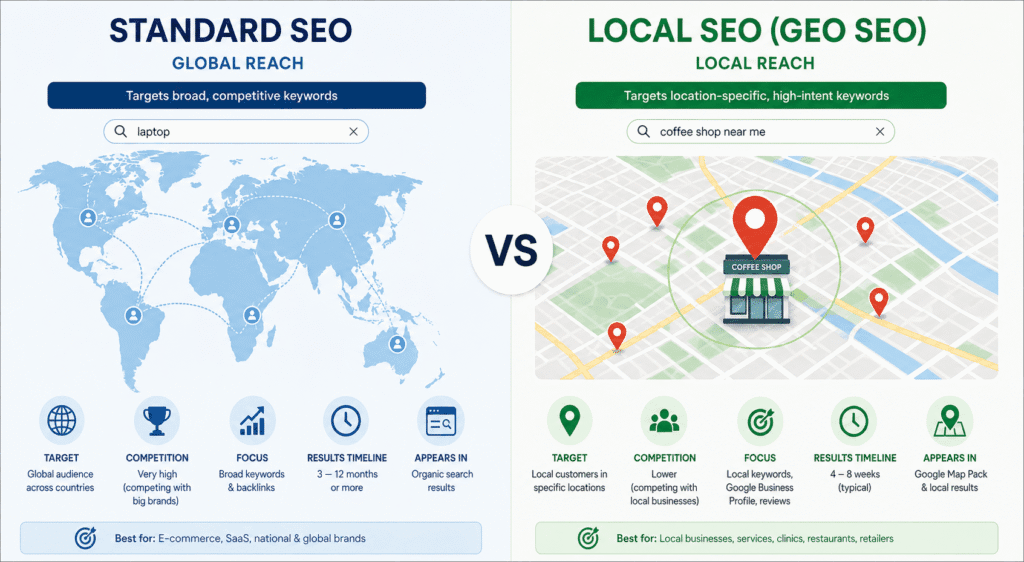
Understanding the difference helps you know where to focus your effort.
| Standard SEO | GEO SEO Integration |
| Targets broad or national keywords | Targets location-specific keywords (city/neighborhood) |
| Competes with national/global sites | Competes with local businesses |
| Focuses on content and backlinks | Relies on Google Business Profile, local content, citations, and reviews |
| Appears in standard organic results | Aims for Google’s Map Pack (the map + 3 business listings) at the top |
| Slower to show results (3–12 months) | Can yield visible results in 4–8 weeks for local terms |
| Best for national brands, e-commerce | Best for local shops, clinics, trades, restaurants, etc. |
The Map Pack shown above is prime real estate in local search. It appears at the top of the page, above normal organic results. Ranking here means getting noticed first. GEO SEO integration is how you can earn a place in that map box[7].
![Illustration: Google’s local “Map Pack” (top results for a location-based search)[7]. GEO SEO strategies aim to get your business into this highly visible box.](https://baroganacsi.com/wp-content/uploads/2026/05/Map-Pack.png)
5. The 6 Core Elements of GEO SEO Integration
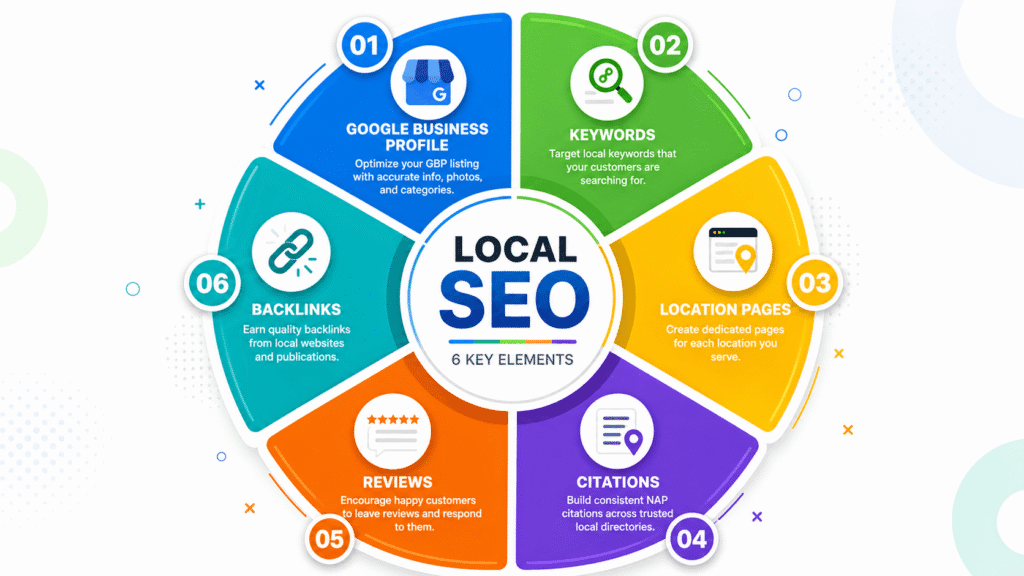
You do not need to do everything at once. But you do need all six of these eventually — they work together as a system.
Element 1: Google Business Profile (GBP)
Your Google Business Profile is the single most important tool for local SEO. It is the listing that appears in Google Maps and the Map Pack.
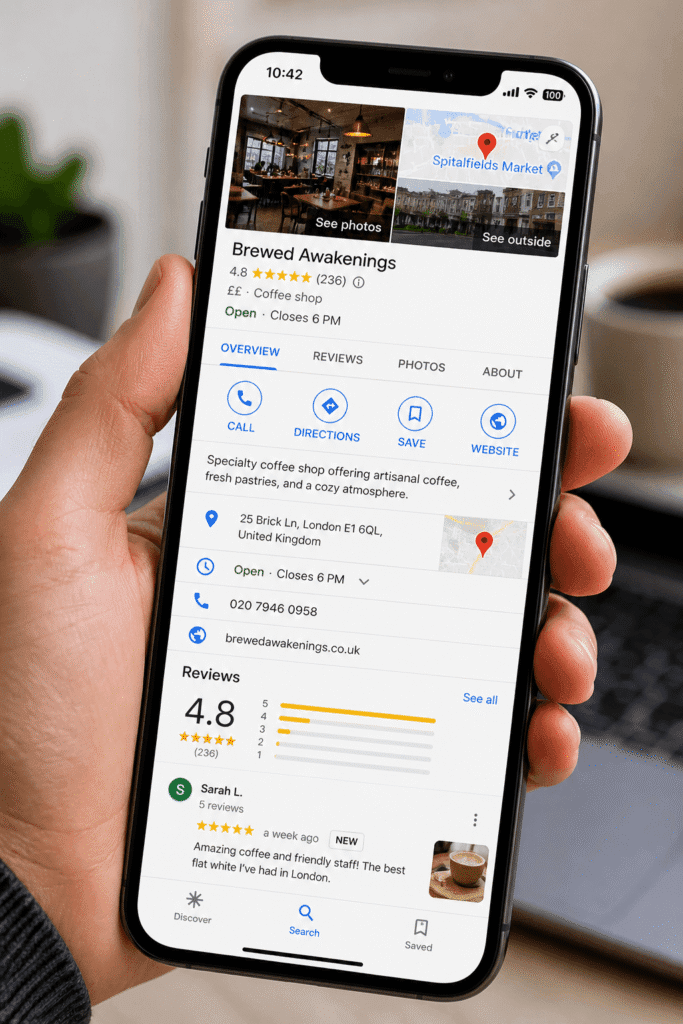
A fully optimized GBP includes:
- Business Name: Use your real, official business name only[3]. Do not stuff extra keywords or locations into the name (that violates Google policy[3]).
- Category: Pick the most accurate primary category (a top ranking factor[8]). Add relevant secondary categories.
- NAP: Ensure your address and phone number exactly match what’s on your website and other listings[9].
- Business hours: Keep hours up-to-date, including holidays.
- Photos: Upload quality photos of your premises, products, and team.
- Description: Write a natural description that includes your service keywords and location.
- Services/Products: List key services or products (with prices if possible).
- Posts: Use GBP posts (like a mini-blog) regularly (Google treats profile activity as a freshness signal[2]).
Key Insight: Google ranks local businesses using proximity (distance to searcher), relevance (how well your info matches the query), and prominence (overall reputation). You can control relevance and prominence through optimization[10]; proximity is fixed by location. If you want to reach farther, use location pages (below).
Element 2: Location-Specific Keywords
Local keyword research finds what people near you search for.
How to find local keywords
Use tools:
- Open Semrush, Ahrefs, or Google Keyword Planner and search your service + city name
- Example: “dentist Edinburgh,” “emergency plumber Manchester,” “seo agency Dublin.”
- Look for keyword variations with lower competition — often the more specific the location, the easier to rank
- dentist Leith” will be easier to rank than “dentist Edinburgh.”
- Check the “People Also Ask” and “Related Searches” sections when you Google your target keyword — these show real local variations
- Look at your competitors’ GBPs — what keywords appear in their reviews and descriptions?
Types of local keywords to target:
| Type | Example |
| Service + city | “roof repair Birmingham” |
| Service + neighborhood | “coffee shop Shoreditch” |
| Near me (implicit location) | “emergency locksmith near me” |
| Best + service + location | “best accountant in Glasgow” |
| Service + “open now” | “Pharmacy open now in Edinburgh.” |
Element 3: Location-Specific Landing Pages
If you serve multiple areas, create a unique page for each.
Not one page that says “We serve London, Manchester, and Birmingham.”
Example URLs:
yoursite.com/seo-agency-london
yoursite.com/seo-agency-manchester
yoursite.com/seo-agency-birmingham
Each page should be unique (don’t just copy-paste). Include:
- Target a specific location keyword in the H1, URL, meta title, and first paragraph.
- Describe your service as it relates specifically to that location
- Include local landmarks, references, or context that signals genuine local presence
- Embed a Google Map showing your location or service area
- Include your full NAP (Name, Address, Phone) for that location
Do not copy the same content across location pages and swap the city name. Google recognizes duplicate content and will not rank these pages well. Each page needs to be genuinely unique.
Element 4: Local Citations
A local citation is any online mention of your business name, address, and phone number (NAP) on directories, review sites, social profiles, and local websites.
Citations signal to Google that your business is real, established, and trustworthy.
The most important citation sources:
- Google Business Profile (already covered above)
- Yelp
- Bing Places
- Apple Maps
- Facebook Business Page
- Industry-specific directories (e.g., Checkatrade for tradespeople, Trustpilot for e-commerce, Zocdoc for healthcare)
- Local Chamber of Commerce websites
- Local newspaper and blog mentions
The golden rule: Consistency is critical.
Your business name, address, and phone number must be identical everywhere (including abbreviations, country codes, formatting)[9]. Any discrepancy (e.g. “St.” vs “Street”) can hurt your local rankings. It’s worth auditing your citations (tools like BrightLocal or Moz Local can help) and correcting any mismatches. Focus on high-value sources first: Google, Apple Maps, Yelp, Bing Places, Facebook, and major local directories. Industry-specific directories and local news sites are also valuable.
Element 5: Reviews and Reputation Management
Reviews are one of the most powerful ranking factors in local SEO.
Google considers:
- Quantity — how many reviews you have (more is generally better)
- Quality — your average star rating
- Recency — how recently you have received new reviews
- Responses — whether you respond to reviews (especially negative ones)
- Keywords in reviews — when customers mention your service and location naturally in their review text, it reinforces your relevance
How to get more reviews:
- Ask every satisfied customer directly — “Would you mind leaving us a Google review? It really helps small businesses like ours.”
- Send a follow-up email after a completed job or purchase with a direct link to your Google review page
- Add a QR code to receipts, business cards, or signage that links directly to your review page
- Never offer incentives for reviews — this violates Google’s guidelines and can get your listing penalised
How to respond to reviews:
- Respond to every review — positive and negative
- For positive reviews: thank them genuinely and mention the service or location
- For negative reviews: respond calmly, take responsibility where appropriate, and offer to resolve the issue offline
Element 6: Local Link Building
Backlinks, links from other websites pointing to yours, are a major ranking factor in both standard and local SEO. For local SEO specifically, links from other local websites carry extra weight.
Where to get local backlinks:
- Local press and news sites — get featured in a local story or write a guest column
- Local bloggers and influencers — offer to be interviewed or collaborate on content
- Local business associations — join your Chamber of Commerce (they often link to member websites)
- Sponsors and partners — sponsor a local event, sports team, or charity (they will often link to you)
- Local directories — many charge a fee, but the link and citation value can be worth it
- Suppliers and partners — ask your business partners to mention and link to you on their websites
Even 5–10 quality local backlinks can significantly improve your Map Pack and organic rankings for local keywords.
These six elements (GBP, keywords, pages, citations, reviews, links) form a system. They reinforce each other: a strong GBP and lots of positive reviews make people click; good content and links make Google rank you higher.
6. Step-by-Step: How to Integrate GEO With SEO
Follow this prioritized action plan in order:
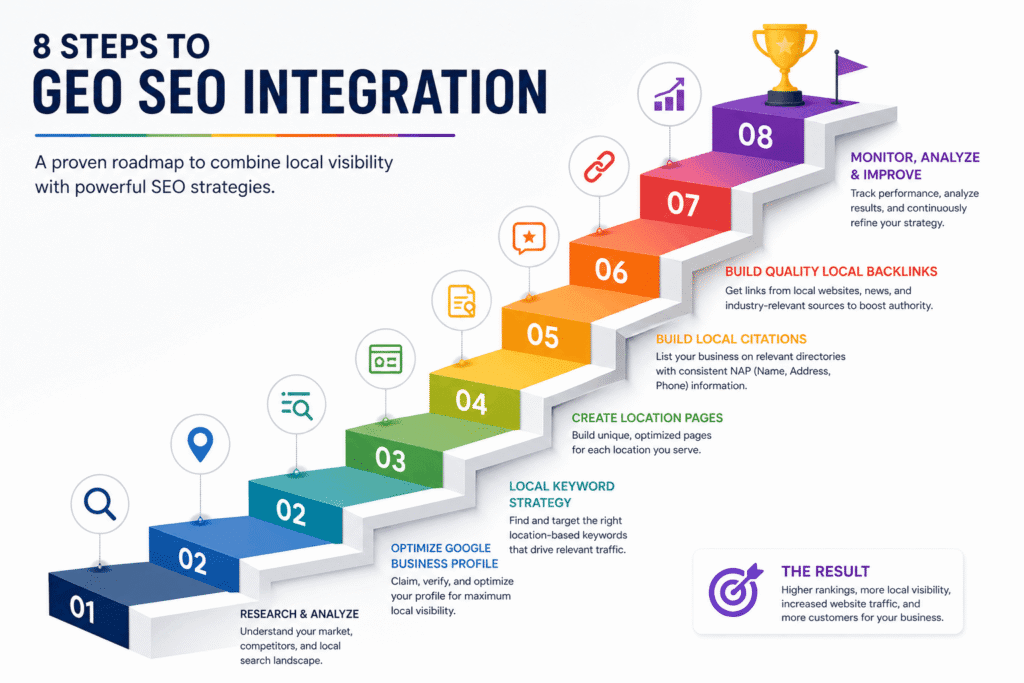
Step 1: Claim and fully optimise your Google Business Profile
Go to google.com/business and claim your listing (if you haven’t). Verify it. Fill in every detail (name, address, phone, hours, categories, description)[2]. Add real photos (interiors, products, team) and a keyword-rich description. Post an update (offer/news) this week.
Step 2: Audit your NAP consistency
Google your business name and review every directory listing. Ensure your Name, Address, Phone (NAP) are exactly the same everywhere[9]. Fix any mismatches (even small differences like “Rd” vs “Road”).
Step 3: Do local keyword research
Use SEO tools to find city/neighborhood search terms. Compile 10–20 relevant local keywords. Organize them by area served.
Step 4: Optimise your homepage and main service pages
Add your primary local keyword to your homepage title tag, H1, and first paragraph. Include your city name naturally in the body content. Add your full address to the footer on every page.
Step 5: Build location-specific pages
For each city/region you serve, make a dedicated page as in Step 5 above. Target one location keyword per page and make the content unique and useful for that area. Embed a Google Map and your address on each page.
Step 6: Build your citations
Submit your business to the top 20 local directories: start with Google, Apple Maps, Bing, Facebook, and Yelp. Then add industry directories (e.g. Zocdoc for health, Houzz for contractors). Use tools (BrightLocal, Whitespark) to find more. Ensure your NAP is consistent when submitting.
Step 7: Start your review-gathering process
Set up a simple system: ask every happy customer for a Google review. For example, send a follow-up email with a direct link to your GBP review form, or display a QR code linking to reviews. Respond to new reviews daily.
Step 8: Pursue local backlinks
Identify 5 local websites that could link to you. A local blogger, a Chamber of Commerce, and a local supplier. Reach out with a genuine reason for them to mention or link to your business.
7. Real Example: A Local Business That Got It Right
Business: A family-run physiotherapy clinic in Bristol
Before GEO SEO integration:
- Website had no location-specific content
- Google Business Profile was unclaimed
- Zero reviews
- Ranking nowhere for local terms
What they did:
1. Claimed and optimized GBP: Added clinic photos, service list, hours, and started weekly posts (offers and health tips).
2. On-site optimization: Added “physiotherapy Bristol” to the homepage title, H1, and body.
3. Created neighborhood pages: One page each for the nearby areas of Redcliffe, Clifton, and Lawrence Hill, targeting those areas with unique content.
4. Built citations: Submitted to 30 directories (and cleaned up old inconsistent listings).
5. Started review process: After appointments, they texted patients a review link and added a QR code on invoices.
6. Earned local press link: They wrote an article on back-pain prevention for a Bristol health blog (with a backlink to their site).
Results after 12 weeks:
- Appeared in the Google Map Pack for “physiotherapist Bristol” — their single biggest traffic source
- Collected 47 new Google reviews (up from 3)
- Organic traffic increased by 210% compared to the same period the previous year
- New patient enquiries from Google: up from 4 per month to 31 per month
Same clinic. Same expertise. Completely different visibility — because they integrated geography into their SEO.
8. Quick GEO SEO Checklist
Use this checklist to audit and track your progress:
Google Business Profile
✅GBP claimed and verified
✅All fields completed (name, address, phone, hours, categories, description)
✅At least 10 real photos uploaded
✅Products or services listed
✅Posted an update in the last 7 days
✅Responding to all reviews
On-Site Optimisation
✅Primary local keyword in homepage title tag, H1, and first paragraph
✅City/region mentioned naturally throughout homepage content
✅Full address in the website footer (on every page)
✅Embedded Google Map on contact page
✅Separate location landing pages (if serving multiple areas)
✅Each location page is unique — not duplicated content
Citations
✅Listed on Google, Yelp, Bing Places, Apple Maps, Facebook
✅Listed on industry-specific directories
✅NAP is identical across all listings
✅No outdated or incorrect listings
Reviews
✅Active review-gathering process in place
✅Responding to every review
✅At least 10 reviews on Google
Local Links
✅ At least 5 local websites linking to yours
✅ Listed in the local Chamber of Commerce or business association
9. Common Mistakes to Avoid
Keyword stuffing your business name on GBP: Don’t add keywords to your business name. For example, “Joe’s Plumbing – Best Emergency Plumber London” will get your GBP suspended[3]. Always use your real business name.
Inconsistent NAP across directories: Even tiny differences (e.g. “Rd.” vs “Road”, phone format +44 vs 0) confuse Google. Double-check every directory and fix mismatches[9].
Duplicate location pages: Copying/pasting the same content to multiple location pages (just swapping city names) triggers duplicate-content penalties. Each page must be genuinely unique to that area.
Ignoring reviews: A business with 3 reviews and no responses will lose to a competitor with 50 reviews and thoughtful responses — even if your service is better. Reviews are a public trust signal that Google weighs heavily.
“Set and forget” GBP: Regularly update your profile (photos, posts, Q&A). Active management of your GBP leads to higher rankings.
Only targeting the city name: Most local businesses target the city, but forget neighborhoods, districts, and nearby towns. A bakery in Notting Hill should target “bakery Notting Hill” and “bakery near Holland Park” — not just “bakery London.”
10. Frequently Asked Questions
How do I integrate GEO with SEO?
How long until I see results from GEO SEO?
Does my business need a physical address for local SEO?
How many location pages should I create?
What is a NAP citation, and why does it matter?
Local SEO vs. GEO SEO integration – what’s the difference?
What to Read Next
Now that you understand how to integrate GEO with SEO, here is where to go next in the series:
- The Complete Guide to SEO Integration → — The pillar page for this entire series. Covers all 8 types of integration, a 7-step strategy, tools, and real examples.
- What Is Integrated SEO? A Beginner’s Guide → — If you want to understand the full framework before diving deeper into individual channels. (Cluster 1)
- How to Integrate SEO Into Your Content Strategy → — Learn how to build your location pages and blog content with SEO built in from the start. (Cluster 2)
- SEO and CMS Integration: WordPress, HubSpot & Beyond → — How to set up your website platform so your location pages and local content are technically optimised. (Cluster 8)
- Best SEO Integration Tools in 2026 → — The best tools for local keyword research, citation management, and GBP optimisation — with free options included. (Cluster 11)
Sources & References
- Google Trends — “Near Me” Search Growth Data (2024): https://trends.google.com
- Google — How Google Determines Local Ranking: https://support.google.com/business/answer/7091
- BrightLocal — Local Consumer Review Survey (2024): https://brightlocal.com/research/local-consumer-review-survey/
- Moz — Local SEO: The Definitive Guide (2025): https://moz.com/learn/seo/local
- Semrush — Local SEO Toolkit Documentation (2026): https://semrush.com/local-seo/
- Google Business Help — How to Optimise Your Business Profile: https://support.google.com/business